优化分类器
本教程将逐步介绍如何根据用户反馈来优化一个分类器。 分类器非常适合进行优化,因为通常收集期望的输出结果相对简单,这使得基于用户反馈创建少量示例变得容易。 这正是我们在本示例中要做的事情。
目标
在这个示例中,我们将构建一个机器人,根据 GitHub 问题的标题对其进行分类。 它将接收一个标题,并将其归类到多个不同类别中的一个。 然后,我们将开始收集用户反馈,并利用这些反馈来优化该分类器的表现。
入门指南
首先,我们需要进行设置,以便将所有跟踪信息发送到特定项目。 我们可以通过设置一个环境变量来实现:
import os
os.environ["LANGSMITH_PROJECT"] = "classifier"
然后,我们可以创建初始应用程序。这将是一个非常简单的函数,它只接收一个 GitHub 问题标题,并尝试为其打上标签。
import openai
from langsmith import traceable, Client
import uuid

client = openai.Client()

available_topics = [
    "bug",
    "improvement",
    "new_feature",
    "documentation",
    "integration",
]

prompt_template = """Classify the type of the issue as one of {topics}.

Issue: {text}"""

@traceable(
    run_type="chain",
    name="Classifier",
)
def topic_classifier(
    topic: str
):
    return client.chat.completions.create(
        model="gpt-4o-mini",
        temperature=0,
        messages=[
            {
                "role": "user",
                "content": prompt_template.format(
                    topics=','.join(available_topics),
                    text=topic,
                )
            }
        ],
    ).choices[0].message.content
然后我们可以开始与它进行交互。 在与其交互时,我们将提前生成 LangSmith 运行 ID,并将其传递给此函数。 这样做是为了之后能够附加反馈信息。
以下是调用该应用程序的方法:
run_id = uuid.uuid4()
topic_classifier(
    "fix bug in LCEL",
    langsmith_extra={"run_id": run_id}
)
以下是之后如何附加反馈的方法。 我们可以通过两种形式收集反馈。
首先,我们可以收集“正面”反馈——用于模型回答正确的示例。
ls_client = Client()
run_id = uuid.uuid4()

topic_classifier(
    "fix bug in LCEL",
    langsmith_extra={"run_id": run_id}
)

ls_client.create_feedback(
    run_id,
    key="user-score",
    score=1.0,
)
接下来,我们可以专注于收集与生成内容的“修正”相对应的反馈。 在此示例中,模型会将其分类为 bug,而我实际上希望它被分类为文档。
ls_client = Client()

run_id = uuid.uuid4()
topic_classifier(
    "fix bug in documentation",
    langsmith_extra={"run_id": run_id}
)

ls_client.create_feedback(
    run_id,
    key="correction",
    correction="documentation"
)
设置自动化
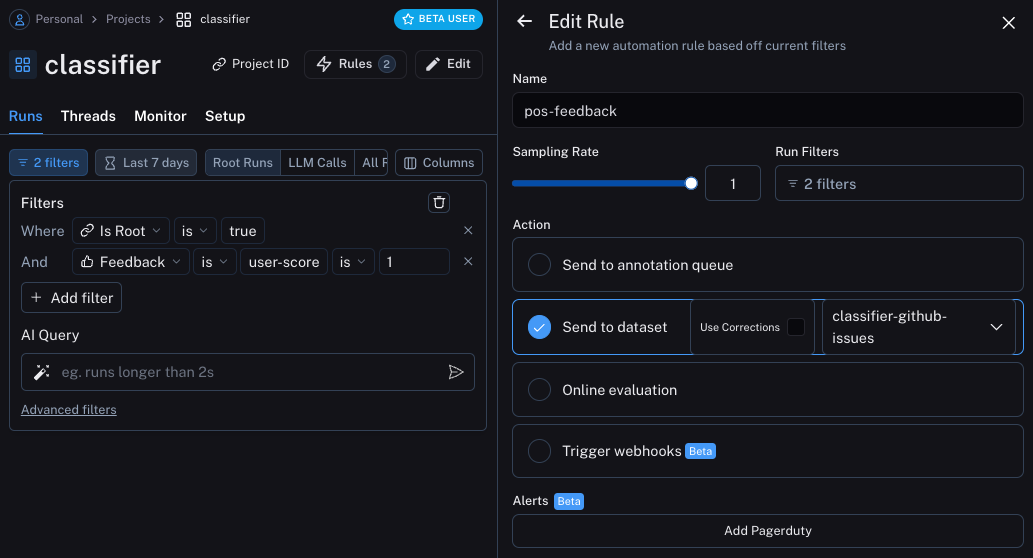
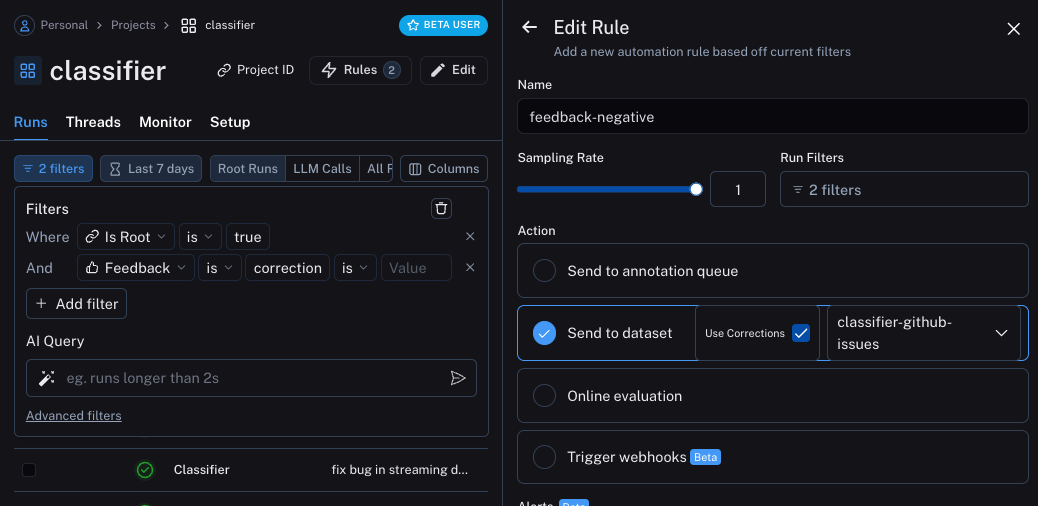
我们现在可以设置自动化流程,将带有某种形式反馈的示例移入数据集。 我们将设置两个自动化流程,一个用于正面反馈,另一个用于负面反馈。
第一个操作将获取所有获得正面反馈的运行记录,并自动将其添加到数据集中。
其背后的逻辑是,任何获得正面反馈的运行记录都可以在未来的迭代中作为良好示例使用。
让我们创建一个名为 classifier-github-issues 的数据集来添加这些数据。
第二个将获取所有带有修正的运行记录,并使用 webhook 将它们添加到数据集中。 在创建此 webhook 时,我们将选择“使用修正”选项。 该选项的作用是,在从一次运行中创建数据点时,不会使用该次运行的输出作为数据点的标准答案, 而是会使用修正后的内容作为标准答案。
更新应用程序
我们现在可以更新代码,以拉取我们正在发送运行结果的数据集。 一旦拉取完成,我们可以创建一个包含这些示例的字符串。 然后,我们可以将此字符串作为提示词的一部分!
### NEW CODE ###

# Initialize the LangSmith Client so we can use to get the dataset
ls_client = Client()

# Create a function that will take in a list of examples and format them into a string
def create_example_string(examples):
    final_strings = []
    for e in examples:
        final_strings.append(f"Input: {e.inputs['topic']}\n> {e.outputs['output']}")
    return "\n\n".join(final_strings)

### NEW CODE ###


client = openai.Client()

available_topics = [
    "bug",
    "improvement",
    "new_feature",
    "documentation",
    "integration",
]

prompt_template = """Classify the type of the issue as one of {topics}.

Here are some examples:

{examples}

Begin!

Issue: {text}
>"""

@traceable(
    run_type="chain",
    name="Classifier",
)
def topic_classifier(
    topic: str
):
    # We can now pull down the examples from the dataset
    # We do this inside the function so it always get the most up-to-date examples,
    # But this can be done outside and cached for speed if desired
    examples = list(ls_client.list_examples(dataset_name="classifier-github-issues"))  # <- New Code
    example_string = create_example_string(examples)

    return client.chat.completions.create(
        model="gpt-4o-mini",
        temperature=0,
        messages=[
            {
                "role": "user",
                "content": prompt_template.format(
                    topics=','.join(available_topics),
                    text=topic,
                    examples=example_string,
                )
            }
        ],
    ).choices[0].message.content
如果现在使用与之前类似的输入来运行应用程序,我们可以看到它能正确识别出:任何与文档相关的内容(即使涉及缺陷)都应被分类为 documentation
ls_client = Client()

run_id = uuid.uuid4()
topic_classifier(
    "address bug in documentation",
    langsmith_extra={"run_id": run_id}
)
示例语义搜索
我们还可以额外做一件事:仅使用语义上最相似的示例。 当你开始积累大量示例时,这种方法非常有用。
为此,我们可以首先定义一个示例,以查找最相似的 k 个示例:
import numpy as np

def find_similar(examples, topic, k=5):
    inputs = [e.inputs['topic'] for e in examples] + [topic]
    vectors = client.embeddings.create(input=inputs, model="text-embedding-3-small")
    vectors = [e.embedding for e in vectors.data]
    vectors = np.array(vectors)
    args = np.argsort(-vectors.dot(vectors[-1])[:-1])[:5]
    examples = [examples[i] for i in args]
    return examples
然后我们可以在应用程序中使用它
ls_client = Client()

def create_example_string(examples):
    final_strings = []
    for e in examples:
        final_strings.append(f"Input: {e.inputs['topic']}\n> {e.outputs['output']}")
    return "\n\n".join(final_strings)


client = openai.Client()

available_topics = [
    "bug",
    "improvement",
    "new_feature",
    "documentation",
    "integration",
]

prompt_template = """Classify the type of the issue as one of {topics}.

Here are some examples:

{examples}

Begin!

Issue: {text}
>"""

@traceable(
    run_type="chain",
    name="Classifier",
)
def topic_classifier(
    topic: str
):
    examples = list(ls_client.list_examples(dataset_name="classifier-github-issues"))
    examples = find_similar(examples, topic)
    example_string = create_example_string(examples)

    return client.chat.completions.create(
        model="gpt-4o-mini",
        temperature=0,
        messages=[
            {
                "role": "user",
                "content": prompt_template.format(
                    topics=','.join(available_topics),
                    text=topic,
                    examples=example_string,
                )
            }
        ],
    ).choices[0].message.content