评估快速入门
评估是衡量大语言模型应用性能的一种量化方法,这一点非常重要,因为大语言模型的行为并不总是可预测的——提示词、模型或输入的微小变化都可能对结果产生显著影响。评估提供了一种结构化的方法来识别问题,比较应用程序不同版本之间的变更,并构建更可靠的AI应用。
评估由三个部分组成:
- 一个包含测试输入、并可选包含预期输出的数据集。
- 一个目标函数,用于定义您要评估的内容。例如,这可能是一次大语言模型(LLM)调用(包含您正在测试的新提示词)、您的应用程序的某一部分,或是您的端到端应用程序。
- 评估器,用于对目标函数的输出进行评分。
本快速入门指南将引导您使用 LangSmith SDK 或用户界面运行一个简单的评估,以测试大语言模型(LLM)响应的正确性。
- SDK
- UI
本快速入门使用开源 openevals 包中预构建的“大语言模型作为评判者”(LLM-as-judge)评估器。OpenEvals 提供了一组常用评估器,对于初次接触评估任务的用户而言,是绝佳的入门起点。
如果您希望在评估应用程序时拥有更高的灵活性,也可以使用您自己的代码定义完全自定义的评估器。
1. 安装依赖项
- Python
- TypeScript
pip install -U langsmith openevals openai
npm install langsmith openevals openai
如果您使用 yarn 作为包管理器,则还需手动将 @langchain/core 作为 openevals 的对等依赖项(peer dependency)进行安装。此步骤通常并非 LangSmith 评估所必需——您可以通过任意自定义代码来定义评估器。
2. 创建 LangSmith API 密钥
要创建API密钥,请前往设置页面,然后点击创建API密钥。
3. 设置你的环境
由于本快速入门使用 OpenAI 模型,您需要设置 OPENAI_API_KEY 环境变量以及必需的 LangSmith 环境变量:
- Shell
export LANGSMITH_TRACING=true
export LANGSMITH_API_KEY="<your-langchain-api-key>"

# This example uses OpenAI, but you can use other LLM providers if desired
export OPENAI_API_KEY="<your-openai-api-key>"
4. 创建数据集
接下来,定义您将用于评估应用程序的示例输入和参考输出对:
- Python
- TypeScript
from langsmith import Client

client = Client()

# Programmatically create a dataset in LangSmith
# For other dataset creation methods, see:
# https://docs.smith.langchain.com/evaluation/how_to_guides/manage_datasets_programmatically
# https://docs.smith.langchain.com/evaluation/how_to_guides/manage_datasets_in_application
dataset = client.create_dataset(
    dataset_name="Sample dataset", description="A sample dataset in LangSmith."
)

# Create examples
examples = [
    {
        "inputs": {"question": "Which country is Mount Kilimanjaro located in?"},
        "outputs": {"answer": "Mount Kilimanjaro is located in Tanzania."},
    },
    {
        "inputs": {"question": "What is Earth's lowest point?"},
        "outputs": {"answer": "Earth's lowest point is The Dead Sea."},
    },
]

# Add examples to the dataset
client.create_examples(dataset_id=dataset.id, examples=examples)
import { Client } from "langsmith";

const client = new Client();

// Programmatically create a dataset in LangSmith
// For other dataset creation methods, see:
// https://docs.smith.langchain.com/evaluation/how_to_guides/manage_datasets_programmatically
// https://docs.smith.langchain.com/evaluation/how_to_guides/manage_datasets_in_application
const dataset = await client.createDataset("Sample dataset", {
  description: "A sample dataset in LangSmith.",
});

// Create inputs and reference outputs
const examples = [
  {
    inputs: { question: "Which country is Mount Kilimanjaro located in?" },
    outputs: { answer: "Mount Kilimanjaro is located in Tanzania." },
    dataset_id: dataset.id,
  },
  {
    inputs: { question: "What is Earth's lowest point?" },
    outputs: { answer: "Earth's lowest point is The Dead Sea." },
    dataset_id: dataset.id,
  },
];

// Add examples to the dataset
await client.createExamples(examples);
5. 定义您要评估的内容
现在,定义一个目标函数,该函数包含您要评估的内容。例如,这可以是包含您正在测试的新提示词的一次大语言模型(LLM)调用、您应用程序的某一部分,或是您的端到端应用程序。
- Python
- TypeScript
from langsmith import wrappers
from openai import OpenAI

# Wrap the OpenAI client for LangSmith tracing
openai_client = wrappers.wrap_openai(OpenAI())

# Define the application logic you want to evaluate inside a target function
# The SDK will automatically send the inputs from the dataset to your target function
def target(inputs: dict) -> dict:
    response = openai_client.chat.completions.create(
        model="gpt-4o-mini",
        messages=[
            {"role": "system", "content": "Answer the following question accurately"},
            {"role": "user", "content": inputs["question"]},
        ],
    )
    return { "answer": response.choices[0].message.content.strip() }
import { wrapOpenAI } from "langsmith/wrappers";
import OpenAI from "openai";

const openai = wrapOpenAI(new OpenAI());

// Define the application logic you want to evaluate inside a target function
// The SDK will automatically send the inputs from the dataset to your target function
async function target(inputs: { question: string }): Promise<{ answer: string }> {
  const response = await openai.chat.completions.create({
    model: "gpt-4o-mini",
    messages: [
      { role: "system", content: "Answer the following question accurately" },
      { role: "user", content: inputs.question },
    ],
  });
  return { answer: response.choices[0].message.content?.trim() || "" };
}
6. 定义评估器
从 openevals 导入预构建的提示词,并创建一个评估器。
outputs 是您目标函数的输出结果。reference_outputs / referenceOutputs 则来自您在上方 第 4 步 中定义的示例对。
CORRECTNESS_PROMPT 仅是一个包含 "inputs"、"outputs" 和 "reference_outputs" 变量的 f-string。
有关自定义 OpenEvals 提示的更多信息,请参阅 此处。
- Python
- TypeScript
from openevals.llm import create_llm_as_judge
from openevals.prompts import CORRECTNESS_PROMPT

def correctness_evaluator(inputs: dict, outputs: dict, reference_outputs: dict):
    evaluator = create_llm_as_judge(
        prompt=CORRECTNESS_PROMPT,
        model="openai:o3-mini",
        feedback_key="correctness",
    )
    eval_result = evaluator(
        inputs=inputs,
        outputs=outputs,
        reference_outputs=reference_outputs
    )
    return eval_result
import { createLLMAsJudge, CORRECTNESS_PROMPT } from "openevals";

const correctnessEvaluator = async (params: {
  inputs: Record<string, unknown>;
  outputs: Record<string, unknown>;
  referenceOutputs?: Record<string, unknown>;
}) => {
  const evaluator = createLLMAsJudge({
    prompt: CORRECTNESS_PROMPT,
    model: "openai:o3-mini",
    feedbackKey: "correctness",
  });
  const evaluatorResult = await evaluator({
    inputs: params.inputs,
    outputs: params.outputs,
    referenceOutputs: params.referenceOutputs,
  });
  return evaluatorResult;
};
7. 运行并查看结果
最后,运行实验!
- Python
- TypeScript
# After running the evaluation, a link will be provided to view the results in langsmith
experiment_results = client.evaluate(
    target,
    data="Sample dataset",
    evaluators=[
        correctness_evaluator,
        # can add multiple evaluators here
    ],
    experiment_prefix="first-eval-in-langsmith",
    max_concurrency=2,
)
import { evaluate } from "langsmith/evaluation";

// After running the evaluation, a link will be provided to view the results in langsmith
await evaluate(
  target,
  {
    data: "Sample dataset",
    evaluators: [
      correctnessEvaluator,
      // can add multiple evaluators here
    ],
    experimentPrefix: "first-eval-in-langsmith",
    maxConcurrency: 2,
  }
);
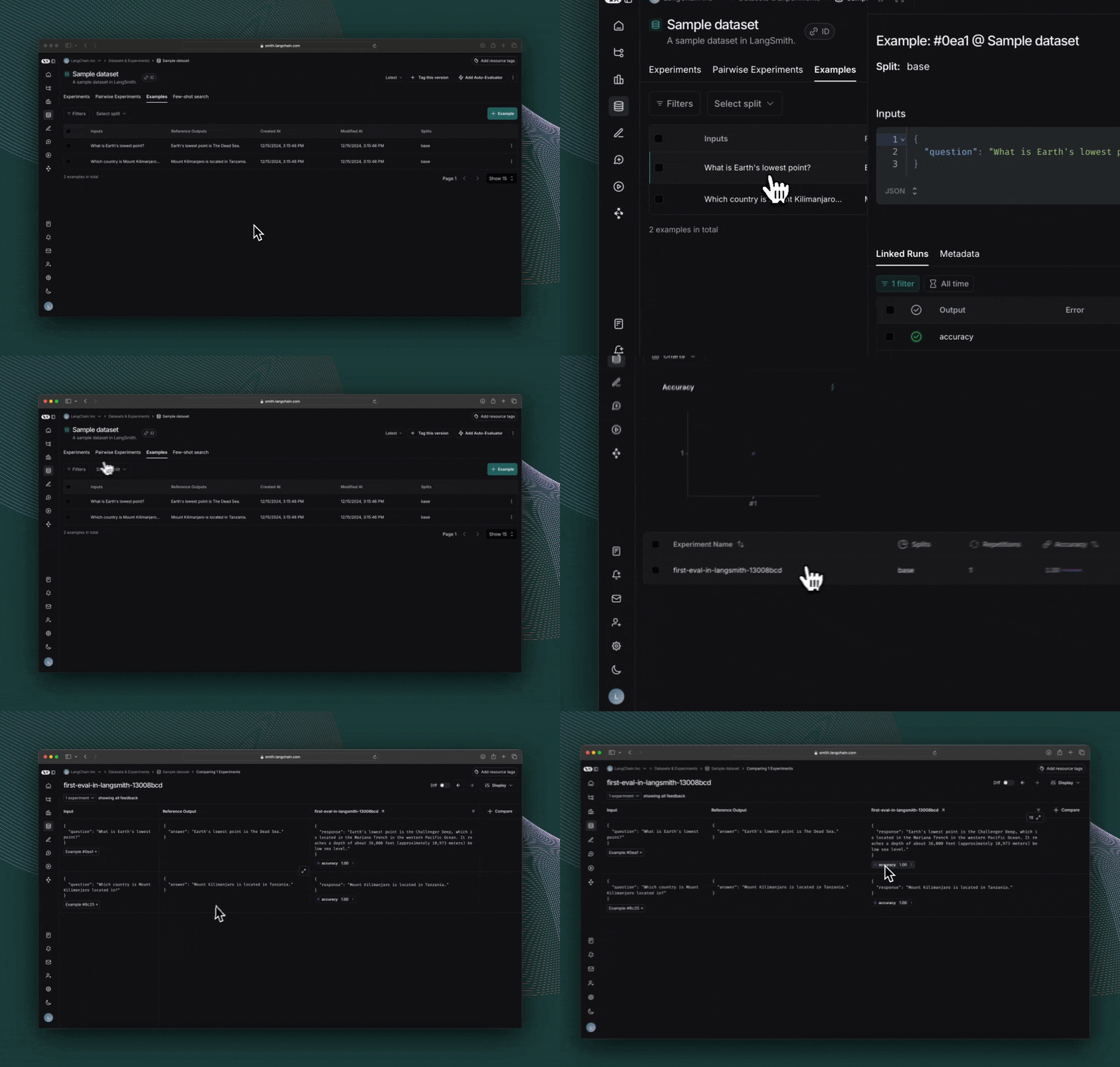
点击评估运行时打印出的链接,访问 LangSmith 实验 UI,并探索实验结果。
下一步
如需了解有关在 LangSmith 中运行实验的更多信息,请阅读评估概念指南。
- 请查看 OpenEvals 项目说明文档(README),了解所有可用的预构建评估器以及如何自定义它们。
- 学习如何定义包含任意代码的自定义评估器。
- 请参阅操操作指南,了解以“我该如何……?”为格式的问题的解答。
- 如需端到端的完整操操作指南,请参阅 教程。
- 如需了解每个类和函数的完整说明,请参阅API 参考文档。
或者,如果您更喜欢视频教程,可以观看《LangSmith 入门课程》中的数据集、评估器与实验视频。
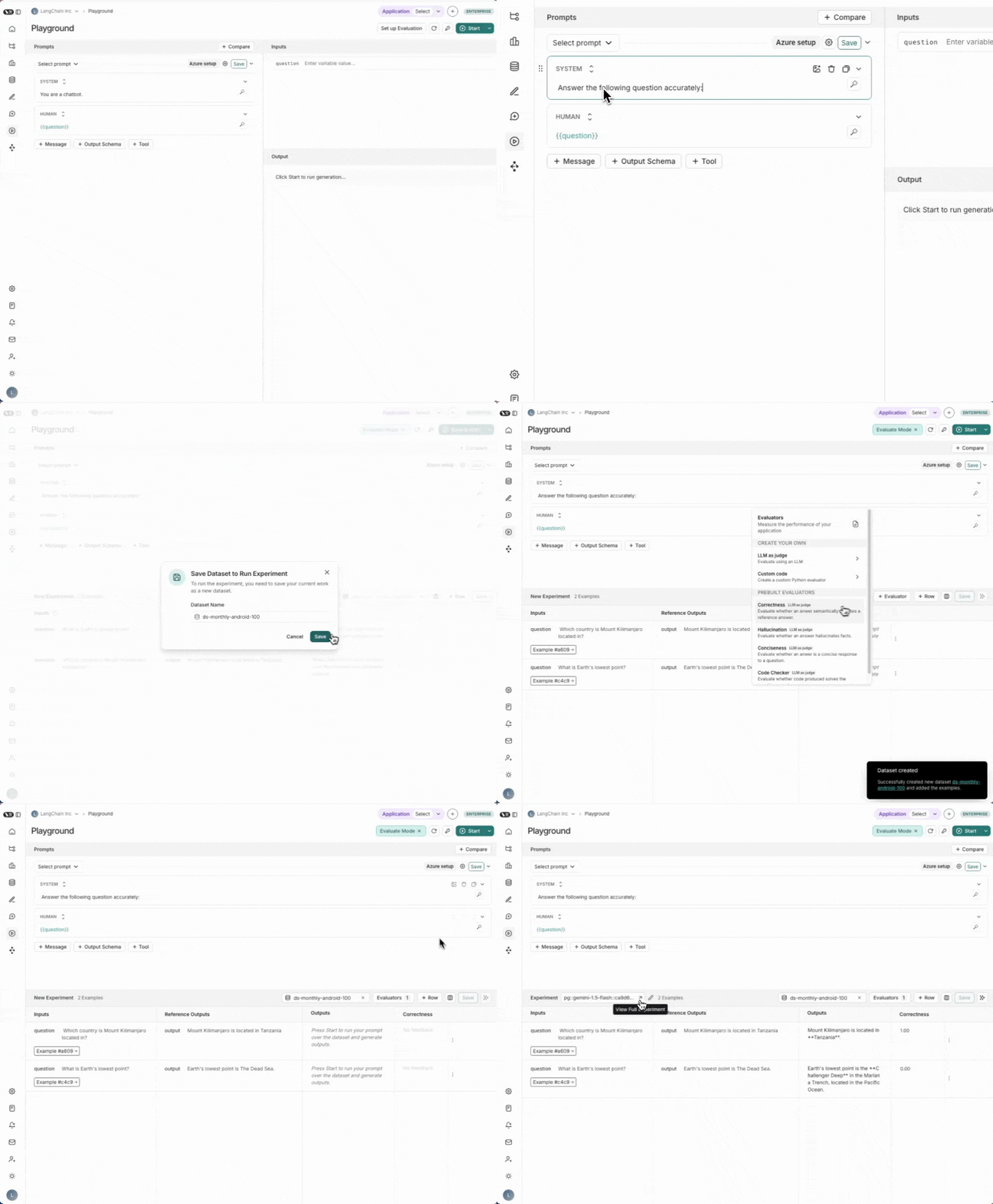
1. 导航到 Playground
LangSmith 的 提示词游乐场 可让您针对不同的提示词、新模型或不同模型配置运行评估。请前往 LangSmith 用户界面中的 游乐场。
2. 创建一个提示
修改系统提示词为:
Answer the following question accurately:
3. 创建数据集
点击 设置评估,然后在下拉菜单中使用 + 新建 按钮创建新数据集。
向数据集中添加以下示例:
| 输入 | 参考输出 |
|---|---|
| question: Which country is Mount Kilimanjaro located in? | output: Mount Kilimanjaro is located in Tanzania. |
| question: What is Earth's lowest point? | output: Earth's lowest point is The Dead Sea. |
点击保存以保存您新创建的数据集。
4. 添加一个评估器
点击 +评估器。从预置的评估器选项中选择 正确性。点击 保存。
5. 运行您的评估
点击右上角的开始按钮以运行您的评估。运行此评估将创建一个实验,您可通过点击实验名称来查看其完整详情。
下一步
如需了解有关在 LangSmith 中运行实验的更多信息,请阅读评估概念指南。
请参阅操操作指南,了解以“我该如何……?”为格式的问题的解答。
- 了解如何在用户界面中创建和管理数据集
- 了解如何在提示词游乐场中运行评估
如果您更喜欢视频教程,请查看《LangSmith 入门课程》中的Playground 视频。