记录自定义LLM追踪信息
如果您未以正确的格式记录大语言模型(LLM)的调用轨迹,系统不会发生任何错误,数据仍会被记录。但该数据将无法以专为大语言模型设计的方式进行处理或渲染。
记录 OpenAI 模型调用轨迹的最佳方式是使用 langsmith SDK(支持 Python 和 TypeScript)中提供的封装器。不过,您也可以遵循下方指南,为自定义模型记录调用轨迹。
LangSmith 为大语言模型(LLM)调用轨迹提供专门的渲染与处理功能,包括令牌计数(假设模型提供商未提供令牌数量)以及基于令牌的成本计算。 要充分利用此功能,您必须以特定格式记录您的 LLM 调用轨迹。
聊天风格模型
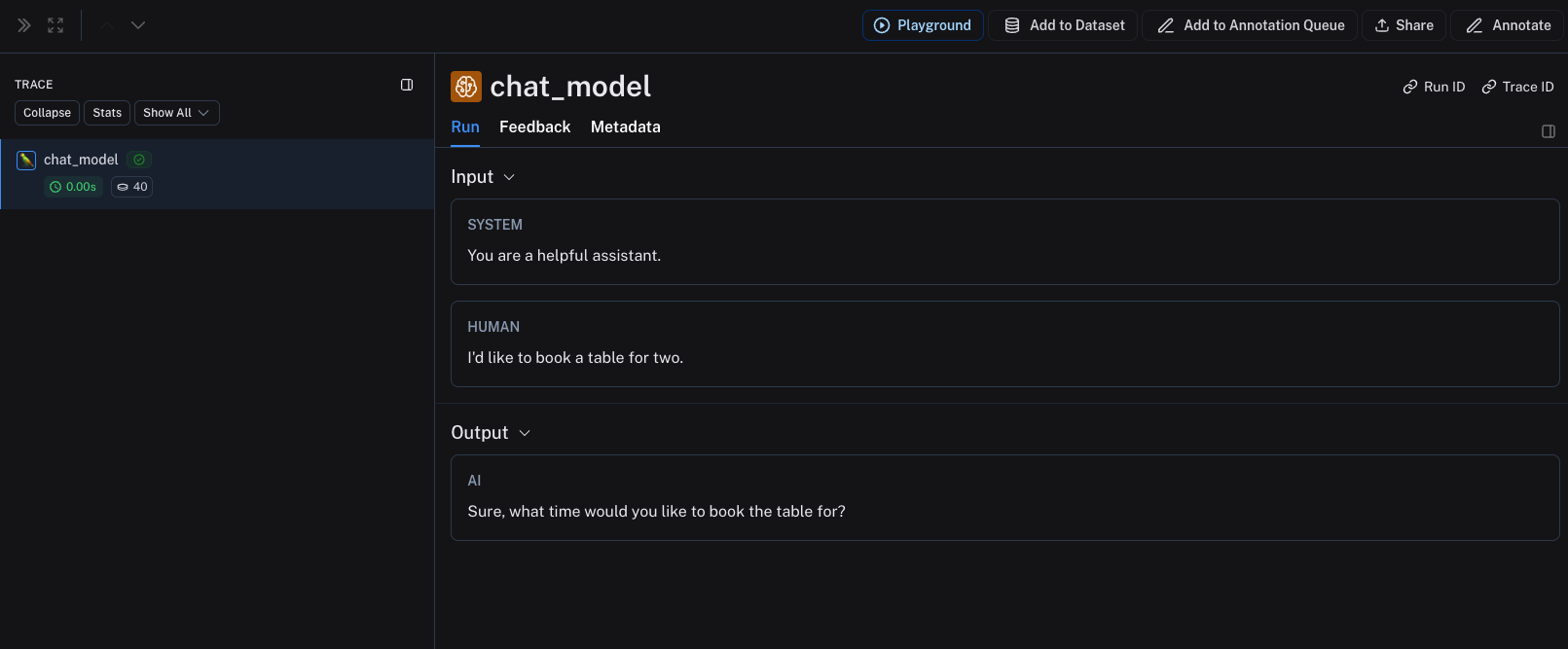
对于聊天式模型,输入必须是符合 OpenAI 格式的消息列表,以 Python 字典或 TypeScript 对象表示。每条消息都必须包含键 role 和 content。
输出可接受以下任意一种格式:
- 一个字典/对象,其键为
choices,对应的值是一个字典/对象列表。该列表中的每个字典/对象都必须包含键message,其值为一个消息对象,该消息对象包含键role和content。 - 一个字典/对象,其中包含键
message,其值为一个消息对象,该消息对象具有键role和content。 - 一个包含两个元素的元组/数组,其中第一个元素为角色,第二个元素为内容。
- 一个字典/对象,其中包含键
role和content。
您函数的输入参数应命名为 messages。
您还可以提供以下 metadata 字段,以帮助 LangSmith 识别模型并计算费用。如果使用 LangChain 或 OpenAI 封装器,这些字段将自动正确填充。有关如何使用 metadata 字段的更多信息,请参阅 本指南。
ls_provider:模型提供商,例如“openai”、“anthropic”等。ls_model_name:模型名称,例如 "gpt-4o-mini"、"claude-3-opus-20240307" 等。
- Python
- TypeScript
from langsmith import traceable

inputs = [
  {"role": "system", "content": "You are a helpful assistant."},
  {"role": "user", "content": "I'd like to book a table for two."},
]

output = {
  "choices": [
      {
          "message": {
              "role": "assistant",
              "content": "Sure, what time would you like to book the table for?"
          }
      }
  ]
}

# Can also use one of:
# output = {
#     "message": {
#         "role": "assistant",
#         "content": "Sure, what time would you like to book the table for?"
#     }
# }
#
# output = {
#     "role": "assistant",
#     "content": "Sure, what time would you like to book the table for?"
# }
#
# output = ["assistant", "Sure, what time would you like to book the table for?"]

@traceable(
  run_type="llm",
  metadata={"ls_provider": "my_provider", "ls_model_name": "my_model"}
)
def chat_model(messages: list):
  return output

chat_model(inputs)
import { traceable } from "langsmith/traceable";

const messages = [
{ role: "system", content: "You are a helpful assistant." },
{ role: "user", content: "I'd like to book a table for two." }
];

const output = {
choices: [
  {
    message: {
      role: "assistant",
      content: "Sure, what time would you like to book the table for?"
    }
  }
]
};

// Can also use one of:
// const output = {
//   message: {
//     role: "assistant",
//     content: "Sure, what time would you like to book the table for?"
//   }
// };
//
// const output = {
//   role: "assistant",
//   content: "Sure, what time would you like to book the table for?"
// };
//
// const output = ["assistant", "Sure, what time would you like to book the table for?"];

const chatModel = traceable(
async ({ messages }: { messages: { role: string; content: string }[] }) => {
  return output;
},
{ run_type: "llm", name: "chat_model", metadata: { ls_provider: "my_provider", ls_model_name: "my_model" } }
);

await chatModel({ messages });
上述代码将记录以下跟踪信息:
流式输出
对于流式处理,您可以将输出“归约”为与非流式版本相同的格式。目前仅在 Python 中支持此功能。
def _reduce_chunks(chunks: list):
    all_text = "".join([chunk["choices"][0]["message"]["content"] for chunk in chunks])
    return {"choices": [{"message": {"content": all_text, "role": "assistant"}}]}

@traceable(
    run_type="llm",
    reduce_fn=_reduce_chunks,
    metadata={"ls_provider": "my_provider", "ls_model_name": "my_model"}
)
def my_streaming_chat_model(messages: list):
    for chunk in ["Hello, " + messages[1]["content"]]:
        yield {
            "choices": [
                {
                    "message": {
                        "content": chunk,
                        "role": "assistant",
                    }
                }
            ]
        }

list(
    my_streaming_chat_model(
        [
            {"role": "system", "content": "You are a helpful assistant. Please greet the user."},
            {"role": "user", "content": "polly the parrot"},
        ],
    )
)
手动提供令牌数量
如需了解如何基于令牌使用信息设置基于令牌的费用跟踪,请参阅本指南。
默认情况下,LangSmith 使用 TikToken 进行 Token 计数,该方法会根据所提供的 ls_model_name 对模型的分词器进行最佳猜测。
许多模型已在响应中直接包含 Token 数量。您可通过在响应中提供 usage_metadata 字段,将这些 Token 数量发送至 LangSmith。
如果向 LangSmith 传递了 Token 信息,系统将使用该信息,而非使用 TikToken。
您可以在函数的响应中添加一个 usage_metadata 键,该键对应的字典包含 input_tokens、output_tokens 和 total_tokens 这三个键。
如果使用 LangChain 或 OpenAI 封装器,这些字段将自动被正确填充。
如果 ls_model_name 在 extra.metadata 中不存在,则可能从 extra.invocation_metadata 中使用其他字段来估算 Token 数量。以下字段将按优先级顺序依次使用:
metadata.ls_model_nameinvocation_params.modelinvocation_params.model_name
- Python
- TypeScript
from langsmith import traceable

inputs = [
  {"role": "system", "content": "You are a helpful assistant."},
  {"role": "user", "content": "I'd like to book a table for two."},
]

output = {
  "choices": [
      {
          "message": {
              "role": "assistant",
              "content": "Sure, what time would you like to book the table for?"
          }
      }
  ],
  "usage_metadata": {
      "input_tokens": 27,
      "output_tokens": 13,
      "total_tokens": 40,
  },
}

@traceable(
  run_type="llm",
  metadata={"ls_provider": "my_provider", "ls_model_name": "my_model"}
)
def chat_model(messages: list):
  return output

chat_model(inputs)
import { traceable } from "langsmith/traceable";

const messages = [
{ role: "system", content: "You are a helpful assistant." },
{ role: "user", content: "I'd like to book a table for two." },
];

const output = {
choices: [
  {
    message: {
      role: "assistant",
      content: "Sure, what time would you like to book the table for?",
    },
  },
],
usage_metadata: {
  input_tokens: 27,
  output_tokens: 13,
  total_tokens: 40,
},
};

const chatModel = traceable(
async ({
  messages,
}: {
  messages: { role: string; content: string }[];
  model: string;
}) => {
  return output;
},
{ run_type: "llm", name: "chat_model", metadata: { ls_provider: "my_provider", ls_model_name: "my_model" } }
);

await chatModel({ messages });
指令式模型
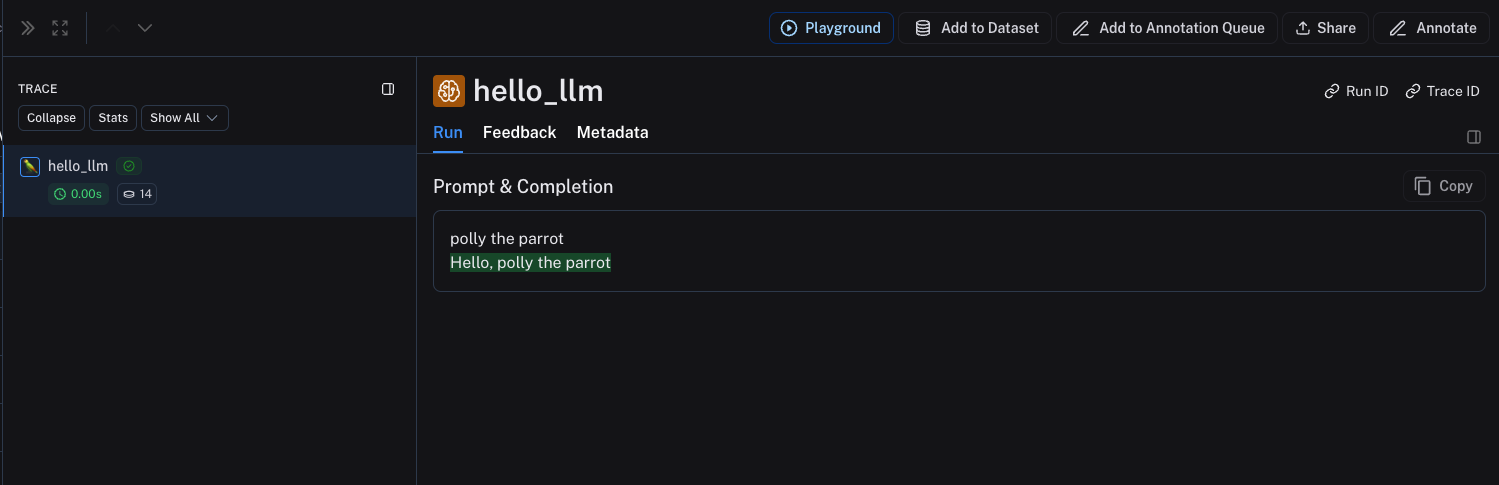
对于指令式模型(输入为字符串,输出也为字符串),您的输入必须包含一个键 prompt,其值为字符串。也允许提供其他输入。输出必须返回一个对象,该对象在序列化后需包含一个键 choices,其值为字典/对象组成的列表;列表中的每个字典/对象都必须包含一个键 text,其值为字符串。
metadata 和 usage_metadata 的规则与聊天式模型相同。
- Python
- TypeScript
@traceable(
  run_type="llm",
  metadata={"ls_provider": "my_provider", "ls_model_name": "my_model"}
)
def hello_llm(prompt: str):
  return {
      "choices": [
          {"text": "Hello, " + prompt}
      ],
      "usage_metadata": {
          "input_tokens": 4,
          "output_tokens": 5,
          "total_tokens": 9,
      },
  }

hello_llm("polly the parrot\n")
import { traceable } from "langsmith/traceable";

const helloLLM = traceable(
({ prompt }: { prompt: string }) => {
  return {
    choices: [
      { text: "Hello, " + prompt }
    ],
      usage_metadata: {
          input_tokens: 4,
          output_tokens: 5,
          total_tokens: 9,
      },
  };
},
{ run_type: "llm", name: "hello_llm", metadata: { ls_provider: "my_provider", ls_model_name: "my_model" } }
);

await helloLLM({ prompt: "polly the parrot\n" });
上述代码将记录以下跟踪信息: