

如何在链中使用工具
在本指南中,我们将介绍创建调用 工具 的链和代理的基本方法。工具可以是任何东西——API、函数、数据库等。工具使模型的能力超越了仅输出文本/消息的范围。正确地提示模型并解析其响应,以确保模型选择正确的工具并为其提供正确的输入,是使用带有工具的模型的关键。
设置
本指南需要安装以下软件包:
%pip install --upgrade --quiet langchain
如果您希望在 LangSmith 中追踪您的运行记录,请取消注释并设置以下环境变量:
import getpass
import os

# os.environ["LANGSMITH_TRACING"] = "true"
# os.environ["LANGSMITH_API_KEY"] = getpass.getpass()
创建一个工具
首先,我们需要创建一个工具来调用。在此示例中,我们将从一个函数创建一个自定义工具。有关创建自定义工具的更多信息,请参阅 此指南。
from langchain_core.tools import tool


@tool
def multiply(first_int: int, second_int: int) -> int:
    """Multiply two integers together."""
    return first_int * second_int
print(multiply.name)
print(multiply.description)
print(multiply.args)
multiply
Multiply two integers together.
{'first_int': {'title': 'First Int', 'type': 'integer'}, 'second_int': {'title': 'Second Int', 'type': 'integer'}}
multiply.invoke({"first_int": 4, "second_int": 5})
20
链式调用
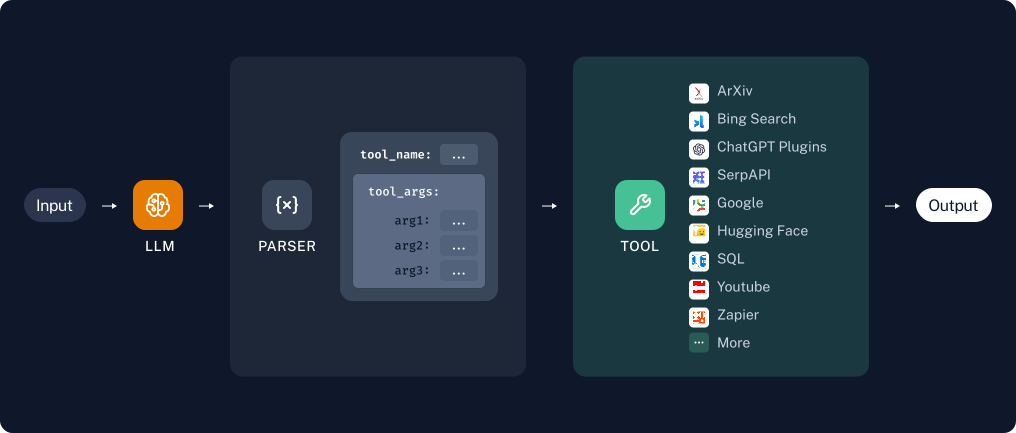
如果我们知道只需要固定次数地使用某个工具,就可以创建一个用于此目的的链。让我们创建一个简单的链,仅用于对用户指定的数字进行乘法运算。
工具/函数调用
使用大型语言模型(LLM)调用工具最可靠的方法之一是通过工具调用API(有时也称为函数调用)。此方法仅适用于明确支持工具调用的模型。您可以在此处查看哪些模型支持工具调用,并在本指南中了解如何使用工具调用。
首先,我们将定义我们的模型和工具。我们先从一个工具开始,multiply。
pip install -qU "langchain[openai]"
import getpass
import os

if not os.environ.get("OPENAI_API_KEY"):
  os.environ["OPENAI_API_KEY"] = getpass.getpass("Enter API key for OpenAI: ")

from langchain.chat_models import init_chat_model

llm = init_chat_model("gpt-4o-mini", model_provider="openai")
我们将使用 bind_tools 将工具的定义作为每次调用模型的一部分传入,以便模型在适当的时候调用该工具:
llm_with_tools = llm.bind_tools([multiply])
当模型调用工具时,这将在输出的 AIMessage.tool_calls 属性中显示:
msg = llm_with_tools.invoke("whats 5 times forty two")
msg.tool_calls
[{'name': 'multiply',
  'args': {'first_int': 5, 'second_int': 42},
  'id': 'call_8QIg4QVFVAEeC1orWAgB2036',
  'type': 'tool_call'}]
查看 LangSmith 跟踪记录。
调用工具
太好了!我们能够生成工具调用。但如果想要真正调用该工具,该怎么办呢?为此,我们需要将生成的工具参数传递给我们的工具。作为一个简单的例子,我们只需提取第一个 tool_call 的参数:
from operator import itemgetter

chain = llm_with_tools | (lambda x: x.tool_calls[0]["args"]) | multiply
chain.invoke("What's four times 23")
92
查看 LangSmith 跟踪记录。
代理
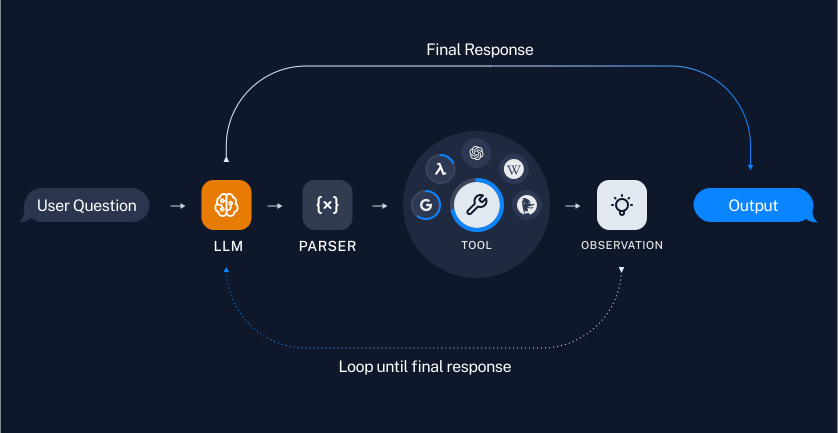
当我们可以确定用户输入所需的工具使用特定顺序时,链(Chains)非常有用。但在某些用例中,使用工具的次数取决于输入内容。在这些情况下,我们希望让模型自身决定使用工具的次数和顺序。 代理(Agents) 让我们实现这一点。
我们将演示一个使用 LangGraph 代理的简单示例。详细了解请参见 此教程。
!pip install -qU langgraph
from langgraph.prebuilt import create_react_agent
代理也非常出色,因为它们能轻松地使用多个工具。
@tool
def add(first_int: int, second_int: int) -> int:
    "Add two integers."
    return first_int + second_int


@tool
def exponentiate(base: int, exponent: int) -> int:
    "Exponentiate the base to the exponent power."
    return base**exponent


tools = [multiply, add, exponentiate]
# Construct the tool calling agent
agent = create_react_agent(llm, tools)
通过代理,我们可以提出需要任意多次使用工具的问题:
# Use the agent

query = (
    "Take 3 to the fifth power and multiply that by the sum of twelve and "
    "three, then square the whole result."
)
input_message = {"role": "user", "content": query}

for step in agent.stream({"messages": [input_message]}, stream_mode="values"):
    step["messages"][-1].pretty_print()
================================[1m Human Message [0m=================================
Take 3 to the fifth power and multiply that by the sum of twelve and three, then square the whole result.
==================================[1m Ai Message [0m==================================
Tool Calls:
exponentiate (call_EHGS8gnEVNCJQ9rVOk11KCQH)
Call ID: call_EHGS8gnEVNCJQ9rVOk11KCQH
Args:
base: 3
exponent: 5
add (call_s2cxOrXEKqI6z7LWbMUG6s8c)
Call ID: call_s2cxOrXEKqI6z7LWbMUG6s8c
Args:
first_int: 12
second_int: 3
=================================[1m Tool Message [0m=================================
Name: add
15
==================================[1m Ai Message [0m==================================
Tool Calls:
multiply (call_25v5JEfDWuKNgmVoGBan0d7J)
Call ID: call_25v5JEfDWuKNgmVoGBan0d7J
Args:
first_int: 243
second_int: 15
=================================[1m Tool Message [0m=================================
Name: multiply
3645
==================================[1m Ai Message [0m==================================
Tool Calls:
exponentiate (call_x1yKEeBPrFYmCp2z5Kn8705r)
Call ID: call_x1yKEeBPrFYmCp2z5Kn8705r
Args:
base: 3645
exponent: 2
=================================[1m Tool Message [0m=================================
Name: exponentiate
13286025
==================================[1m Ai Message [0m==================================
The final result of taking 3 to the fifth power, multiplying it by the sum of twelve and three, and then squaring the whole result is **13,286,025**.
查看 LangSmith 跟踪记录。