使用 LangSmith 运行 SWE-bench
SWE-bench 是开发者测试其编码智能体时最流行(也是最难!)的基准之一。在本教程中,我们将向您展示如何将 SWE-bench 数据集加载到 LangSmith 中,并轻松地对其进行评估,从而让您比使用现成的 SWE-bench 评估套件更清晰地了解智能体的行为表现。这使得您可以更快地定位具体问题,并快速迭代优化您的智能体以提升性能!
正在加载数据
为了加载数据,我们将从 Hugging Face 拉取 dev 分割,但对于您的使用场景,您可能希望拉取 test 或 train 分割之一,如果您想合并多个分割,可以使用 pd.concat。
import pandas as pd

splits = {'dev': 'data/dev-00000-of-00001.parquet', 'test': 'data/test-00000-of-00001.parquet', 'train': 'data/train-00000-of-00001.parquet'}
df = pd.read_parquet("hf://datasets/princeton-nlp/SWE-bench/" + splits["dev"])
编辑“version”列
这是一步非常重要的操作!如果跳过,其余代码将无法运行!
version 列包含所有字符串值,但这些值均以浮点数格式存储,因此当您上传 CSV 文件以创建 LangSmith 数据集时,它们会被自动转换为浮点数。尽管您可以在实验过程中将这些值手动转换回字符串,但像 "0.10" 这样的值会引发问题:当它被转换为浮点数时,得到的值是 0.1;若再将其转为字符串,则会变成 "0.1",从而在执行您提议的补丁时导致键错误(key error)。
为了解决此问题,我们需要让 LangSmith 停止尝试将 version 列转换为浮点数。为此,我们可以为每个值添加一个无法被解析为浮点数的字符串前缀。随后在执行评估时,需按该前缀进行分割,以提取出实际的 version 值。此处所选的前缀为字符串 "version:"。
未来将添加在 LangSmith 中上传 CSV 文件时选择列类型的功能,以避免使用此变通方法。
df['version'] = df['version'].apply(lambda x: f"version:{x}")
将数据上传到 LangSmith
保存为CSV
要将数据上传到 LangSmith,我们首先需要使用 pandas 提供的 to_csv 函数将其保存为 CSV 文件。请确保将此文件保存在您易于访问的位置。
df.to_csv("./../SWE-bench.csv",index=False)
手动将CSV文件上传到LangSmith
现在,我们已准备好将CSV文件上传至LangSmith。请访问LangSmith网站(smith.langchain.com),然后在左侧导航栏中点击 Datasets & Testing 标签页,再单击右上角的 + New Dataset 按钮。
然后点击顶部的 Upload CSV 按钮,并选择您在上一步中保存的 CSV 文件。接着,您可以为您的数据集指定一个名称和描述。
接下来,选择 Key-Value 作为数据集类型。最后,转到 Create Schema 部分,并将所有密钥(ALL OF THE KEYS)添加为 Input fields。本示例中没有 Output fields,因为我们的评估器并非与参考答案进行对比,而是将在 Docker 容器中运行实验输出,以确保代码确实解决了 PR 问题。
在您填写完 Input fields(并确保 Output fields 保持为空!)后,即可点击右上角的蓝色 Create 按钮,您的数据集将被创建!
以编程方式将CSV上传到LangSmith
或者,您可以使用下方代码块中所示的 SDK 将 CSV 文件上传至 LangSmith:
dataset = client.upload_csv(
    csv_file="./../SWE-bench-dev.csv",
    input_keys=list(df.columns),
    output_keys=[],
    name="swe-bench-programatic-upload",
    description="SWE-bench dataset",
    data_type="kv"
)
为加快测试创建数据集分割
由于在全部示例上运行 SWE-bench 评估器耗时较长,您可以创建一个“测试”数据集划分,以便快速测试评估器及您的代码。请阅读 本指南 了解有关管理数据集划分的更多信息,或观看下方简短视频(要进入视频起始页面,只需点击上方创建的数据集,然后切换到 Examples 标签页):
运行我们的预测函数
在 SWE-bench 上运行评估与您通常在 LangSmith 上执行的大多数评估略有不同,原因在于我们没有参考输出。因此,我们首先生成所有输出,而不运行评估器(请注意,evaluate 调用中未设置 evaluators 参数)。在此示例中,我们返回了一个虚拟的 predict 函数,但您可以在 predict 函数内插入您的智能体逻辑,以使其按预期工作。
from langsmith import evaluate
from langsmith import Client

client = Client()

def predict(inputs: dict):
    return {"instance_id":inputs['instance_id'],"model_patch":"None","model_name_or_path":"test-model"}

result = evaluate(
    predict,
    data=client.list_examples(dataset_id="a9bffcdf-1dfe-4aef-8805-8806f0110067",splits=["test"]),
)
查看实验“perfect-lip-22”的评估结果,地址为: https://smith.langchain.com/o/ebbaf2eb-769b-4505-aca2-d11de10372a4/datasets/a9bffcdf-1dfe-4aef-8805-8806f0110067/compare?selectedSessions=182de5dc-fc9d-4065-a3e1-34527f952fd8
3次迭代 [耗时00:00,24.48次/秒]
使用 SWE-bench 评估我们的预测结果
现在,我们可以运行以下代码,在 Docker 中执行上述生成的预测补丁。该代码经过略微修改,源自 SWE-bench run_evaluation.py 文件。
本质上,该代码通过设置 Docker 镜像来并行运行预测任务,从而大幅缩短评估所需的时间。此截图说明了 SWE-bench 在底层执行评估的基本原理。如需全面理解其工作机制,请务必通读 GitHub 仓库 中的相关代码。
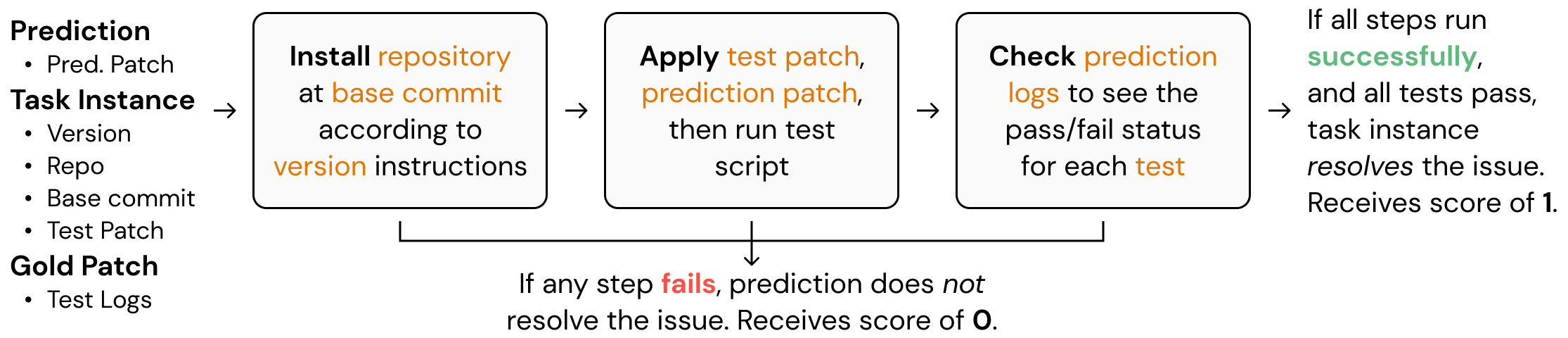
函数 convert_runs_to_langsmith_feedback 将 Docker 文件生成的日志转换为格式良好的 .json 文件,该文件以 LangSmith 典型的键/分数(key/score)方式包含反馈信息。
from swebench.harness.run_evaluation import run_instances
import resource
import docker
from swebench.harness.docker_utils import list_images, clean_images
from swebench.harness.docker_build import build_env_images
from pathlib import Path
import json
import os

RUN_EVALUATION_LOG_DIR = Path("logs/run_evaluation")
LANGSMITH_EVALUATION_DIR = './langsmith_feedback/feedback.json'

def convert_runs_to_langsmith_feedback(
        predictions: dict,
        full_dataset: list,
        run_id: str
    ) -> float:
    """
    Convert logs from docker containers into LangSmith feedback.

    Args:
        predictions (dict): Predictions dict generated by the model
        full_dataset (list): List of all instances
        run_id (str): Run ID
    """
    feedback_for_all_instances = {}

    for instance in full_dataset:
        feedback_for_instance = []
        instance_id = instance['instance_id']
        prediction = predictions[instance_id]
        if prediction.get("model_patch", None) in ["", None]:
            # Prediction returned an empty patch
            feedback_for_all_instances[prediction['run_id']] = [{"key":"non-empty-patch","score":0},
                                                                {"key":"completed-patch","score":0},
                                                                {"key":"resolved-patch","score":0}]
            continue
        feedback_for_instance.append({"key":"non-empty-patch","score":1})
        report_file = (
            RUN_EVALUATION_LOG_DIR
            / run_id
            / prediction["model_name_or_path"].replace("/", "__")
            / prediction['instance_id']
            / "report.json"
        )
        if report_file.exists():
            # If report file exists, then the instance has been run
            feedback_for_instance.append({"key":"completed-patch","score":1})
            report = json.loads(report_file.read_text())
            # Check if instance actually resolved the PR
            if report[instance_id]["resolved"]:
                feedback_for_instance.append({"key":"resolved-patch","score":1})
            else:
                feedback_for_instance.append({"key":"resolved-patch","score":0})
        else:
            # The instance did not run successfully
            feedback_for_instance += [{"key":"completed-patch","score":0},{"key":"resolved-patch","score":0}]
        feedback_for_all_instances[prediction['run_id']] = feedback_for_instance

    os.makedirs(os.path.dirname(LANGSMITH_EVALUATION_DIR), exist_ok=True)
    with open(LANGSMITH_EVALUATION_DIR, 'w') as json_file:
        json.dump(feedback_for_all_instances, json_file)

def evaluate_predictions(
        dataset: list,
        predictions: list,
        max_workers: int,
        force_rebuild: bool,
        cache_level: str,
        clean: bool,
        open_file_limit: int,
        run_id: str,
        timeout: int,
    ):
    """
    Run evaluation harness for the given dataset and predictions.
    """
    # set open file limit
    assert len(run_id) > 0, "Run ID must be provided"
    resource.setrlimit(resource.RLIMIT_NOFILE, (open_file_limit, open_file_limit))
    client = docker.from_env()

    existing_images = list_images(client)
    print(f"Running {len(dataset)} unevaluated instances...")
    # build environment images + run instances
    build_env_images(client, dataset, force_rebuild, max_workers)
    run_instances(predictions, dataset, cache_level, clean, force_rebuild, max_workers, run_id, timeout)

    # clean images + make final report
    clean_images(client, existing_images, cache_level, clean)

    convert_runs_to_langsmith_feedback(predictions,dataset,run_id)
dataset = []
predictions = {}
for res in result:
    predictions[res['run'].outputs['instance_id']] = {**res['run'].outputs,**{"run_id":str(res['run'].id)}}
    dataset.append(res['run'].inputs['inputs'])
for d in dataset:
    d['version'] = d['version'].split(":")[1]
evaluate_predictions(dataset,predictions,max_workers=8,force_rebuild=False,cache_level="env",clean=False \
                     ,open_file_limit=4096,run_id="test",timeout=1_800)
    Running 3 unevaluated instances...
    Base image sweb.base.arm64:latest already exists, skipping build.
    Base images built successfully.
    Total environment images to build: 2


    Building environment images: 100%|██████████| 2/2 [00:47<00:00, 23.94s/it]

    All environment images built successfully.
    Running 3 instances...


      0%|          | 0/3 [00:00<?, ?it/s]

    Evaluation error for sqlfluff__sqlfluff-884: >>>>> Patch Apply Failed:
    patch unexpectedly ends in middle of line
    patch: **** Only garbage was found in the patch input.

    Check (logs/run_evaluation/test/test-model/sqlfluff__sqlfluff-884/run_instance.log) for more information.
    Evaluation error for sqlfluff__sqlfluff-4151: >>>>> Patch Apply Failed:
    patch unexpectedly ends in middle of line
    patch: **** Only garbage was found in the patch input.

    Check (logs/run_evaluation/test/test-model/sqlfluff__sqlfluff-4151/run_instance.log) for more information.
    Evaluation error for sqlfluff__sqlfluff-2849: >>>>> Patch Apply Failed:
    patch: **** Only garbage was found in the patch input.
    patch unexpectedly ends in middle of line

    Check (logs/run_evaluation/test/test-model/sqlfluff__sqlfluff-2849/run_instance.log) for more information.


    100%|██████████| 3/3 [00:30<00:00, 10.04s/it]

    All instances run.
    Cleaning cached images...
    Removed 0 images.
正在向 LangSmith 发送评估
现在,我们可以通过使用 evaluate_existing 函数,将评估反馈实际发送到 LangSmith。在此情况下,我们的 evaluate 函数极为简单,因为上方的 convert_runs_to_langsmith_feedback 函数已为我们极大简化了工作——它将所有反馈保存到了单个文件中。
from langsmith import evaluate_existing
from langsmith.schemas import Example, Run

def swe_bench_evaluator(run: Run, example: Example):
    with open(LANGSMITH_EVALUATION_DIR, 'r') as json_file:
        langsmith_eval = json.load(json_file)
    return {"results": langsmith_eval[str(run.id)]}

experiment_name = result.experiment_name
evaluate_existing(experiment_name, evaluators=[swe_bench_evaluator])
    View the evaluation results for experiment: 'perfect-lip-22' at:
    https://smith.langchain.com/o/ebbaf2eb-769b-4505-aca2-d11de10372a4/datasets/a9bffcdf-1dfe-4aef-8805-8806f0110067/compare?selectedSessions=182de5dc-fc9d-4065-a3e1-34527f952fd8


    3it [00:01,  1.52it/s]


    <ExperimentResults perfect-lip-22>
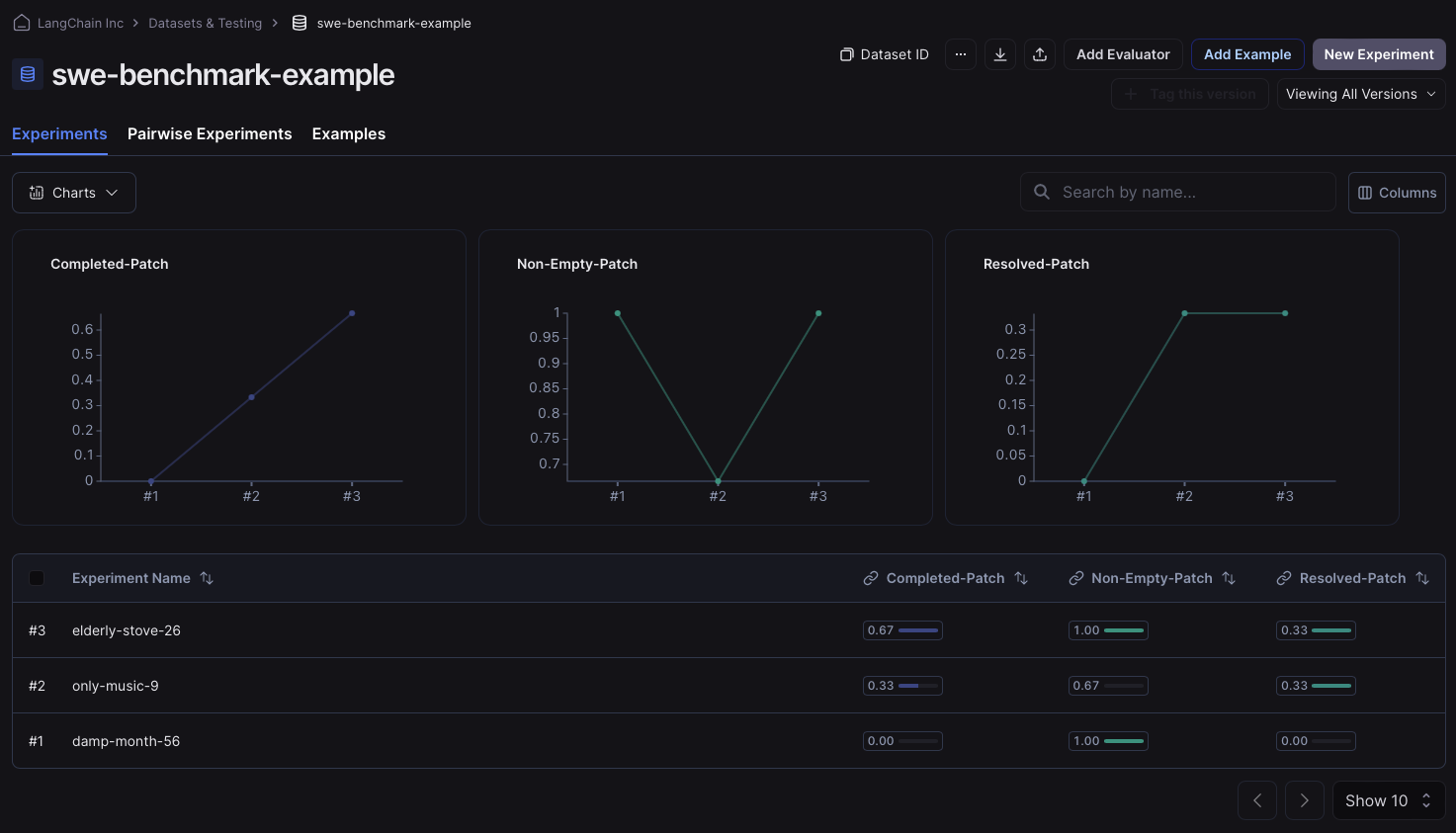
运行后,我们可以进入数据集的“实验”标签页,检查反馈键是否已正确分配。如果已正确分配,您将看到类似以下图片的内容: