如何运行成对评估
LangSmith 支持以对比方式评估现有实验。 这使您能够对多个实验的输出结果进行相互评分,而不仅限于逐个单独评估输出结果。 可类比LMSYS 聊天机器人竞技场(Chatbot Arena)——其概念与此完全相同! 要实现此功能,请对两个现有实验使用evaluate()函数。
如果您尚未创建实验来进行对比,请查看我们的 快速入门 或 操操作指南 以开始进行评估。
evaluate() 比较参数
本指南要求 Python 版本 >=0.2.0 或 JavaScript 版本 >=0.2.9。
最简单的 evaluate / aevaluate 函数接受以下参数:
| 参数 | 描述 |
|---|---|
target | A list of the two existing experiments you would like to evaluate against each other. These can be uuids or experiment names. |
evaluators | A list of the pairwise evaluators that you would like to attach to this evaluation. See the section below for how to define these. |
除了这些参数外,您还可以传入以下可选参数:
| 参数 | 描述 |
|---|---|
randomize_order / randomizeOrder | An optional boolean indicating whether the order of the outputs should be randomized for each evaluation. This is a strategy for minimizing positional bias in your prompt: often, the LLM will be biased towards one of the responses based on the order. This should mainly be addressed via prompt engineering, but this is another optional mitigation. Defaults to False. |
experiment_prefix / experimentPrefix | A prefix to be attached to the beginning of the pairwise experiment name. Defaults to None. |
description | A description of the pairwise experiment. Defaults to None. |
max_concurrency / maxConcurrency | The maximum number of concurrent evaluations to run. Defaults to 5. |
client | The LangSmith client to use. Defaults to None. |
metadata | Metadata to attach to your pairwise experiment. Defaults to None. |
load_nested / loadNested | Whether to load all child runs for the experiment. When False, only the root trace will be passed to your evaluator. Defaults to False. |
定义一个成对评估器
成对评估器仅仅是具有特定签名的函数。
评估器参数
自定义评估函数必须具有特定的参数名称。它们可以接受以下参数中的任意子集:
inputs: dict:数据集中单个示例对应的输入字典。outputs: list[dict]:由每个实验在给定输入上生成的字典输出所组成的包含两项的列表。reference_outputs/referenceOutputs: dict:参考输出的字典(如果可用),与该示例相关联。runs: list[Run]: 一个包含两个元素的列表,其中每个元素均为针对给定示例所执行的两次实验生成的完整 运行(Run) 对象。如果需要访问各次运行的中间步骤或元数据,请使用此选项。example: Example:完整的数据集 示例,包括示例输入、输出(如果可用)和元数据(如果可用)。
对于大多数使用场景,您只需使用 inputs、outputs 和 reference_outputs / referenceOutputs。仅当您需要在应用程序的实际输入和输出之外额外获取某些跟踪信息或示例元数据时,才需使用 run 和 example。
评估器输出
自定义评估器应返回以下类型之一:
Python 与 JavaScript/TypeScript
dict:键值对字典:key,表示将被记录的反馈键scores,即从运行 ID 到该次运行得分的映射。comment,这是一个字符串。最常用于模型推理。
目前仅支持 Python
list[int | float | bool]:一个包含两个评分值的列表。该列表的顺序与runs/outputs评估器参数的顺序一致。评估器函数名称将用作反馈键(feedback key)。
请注意,您应选择一个与运行中标准反馈不同的反馈键。我们建议为成对反馈键添加前缀 pairwise_ 或 ranked_。
运行成对评估
以下示例使用一个提示词,要求大语言模型(LLM)判断两个AI助手回复中哪一个更优。该示例采用结构化输出来解析AI的响应:0、1 或 2。
在下面的 Python 示例中,我们从 结构化提示模板 中获取该提示,并将其与 LangChain 的聊天模型封装器配合使用。
使用 LangChain 完全是可选的。 为说明这一点,TypeScript 示例直接使用了 OpenAI SDK。
- Python
- TypeScript
需要 langsmith>=0.2.0
from langchain import hub
from langchain.chat_models import init_chat_model
from langsmith import evaluate

# See the prompt: https://smith.langchain.com/hub/langchain-ai/pairwise-evaluation-2
prompt = hub.pull("langchain-ai/pairwise-evaluation-2")
model = init_chat_model("gpt-4o")
chain = prompt | model

def ranked_preference(inputs: dict, outputs: list[dict]) -> list:
    # Assumes example inputs have a 'question' key and experiment
    # outputs have an 'answer' key.
    response = chain.invoke({
        "question": inputs["question"],
        "answer_a": outputs[0].get("answer", "N/A"),
        "answer_b": outputs[1].get("answer", "N/A"),
    })

    if response["Preference"] == 1:
        scores = [1, 0]
    elif response["Preference"] == 2:
        scores = [0, 1]
    else:
        scores = [0, 0]
    return scores

evaluate(
    ("experiment-1", "experiment-2"),  # Replace with the names/IDs of your experiments
    evaluators=[ranked_preference],
    randomize_order=True,
    max_concurrency=4,
)
需要 langsmith>=0.2.9
import { evaluate} from "langsmith/evaluation";
import { Run } from "langsmith/schemas";
import { wrapOpenAI } from "langsmith/wrappers";
import OpenAI from "openai";
import { z } from "zod";

const openai = wrapOpenAI(new OpenAI());

async function rankedPreference({
  inputs,
  runs,
}: {
  inputs: Record<string, any>;
  runs: Run[];
}) {
  const scores: Record<string, number> = {};
  const [runA, runB] = runs;

  if (!runA || !runB) throw new Error("Expected at least two runs");

  const payload = {
    question: inputs.question,
    answer_a: runA?.outputs?.output ?? "N/A",
    answer_b: runB?.outputs?.output ?? "N/A",
  };

  const output = await openai.chat.completions.create({
    model: "gpt-4-turbo",
    messages: [
      {
        role: "system",
        content: [
          "Please act as an impartial judge and evaluate the quality of the responses provided by two AI assistants to the user question displayed below.",
          "You should choose the assistant that follows the user's instructions and answers the user's question better.",
          "Your evaluation should consider factors such as the helpfulness, relevance, accuracy, depth, creativity, and level of detail of their responses.",
          "Begin your evaluation by comparing the two responses and provide a short explanation.",
          "Avoid any position biases and ensure that the order in which the responses were presented does not influence your decision.",
          "Do not allow the length of the responses to influence your evaluation. Do not favor certain names of the assistants. Be as objective as possible.",
        ].join(" "),
      },
      {
        role: "user",
        content: [
          `[User Question] ${payload.question}`,
          `[The Start of Assistant A's Answer] ${payload.answer_a} [The End of Assistant A's Answer]`,
          `The Start of Assistant B's Answer] ${payload.answer_b} [The End of Assistant B's Answer]`,
        ].join("\n\n"),
      },
    ],
    tool_choice: {
      type: "function",
      function: { name: "Score" },
    },
    tools: [
      {
        type: "function",
        function: {
          name: "Score",
          description: [
            `After providing your explanation, output your final verdict by strictly following this format:`,
            `Output "1" if Assistant A answer is better based upon the factors above.`,
            `Output "2" if Assistant B answer is better based upon the factors above.`,
            `Output "0" if it is a tie.`,
          ].join(" "),
          parameters: {
            type: "object",
            properties: {
              Preference: {
                type: "integer",
                description: "Which assistant answer is preferred?",
              },
            },
          },
        },
      },
    ],
  });

  const { Preference } = z
    .object({ Preference: z.number() })
    .parse(
      JSON.parse(output.choices[0].message.tool_calls[0].function.arguments)
    );

  if (Preference === 1) {
    scores[runA.id] = 1;
    scores[runB.id] = 0;
  } else if (Preference === 2) {
    scores[runA.id] = 0;
    scores[runB.id] = 1;
  } else {
    scores[runA.id] = 0;
    scores[runB.id] = 0;
  }

  return { key: "ranked_preference", scores };
}

await evaluate(["earnest-name-40", "reflecting-pump-91"], {
  evaluators: [rankedPreference],
});
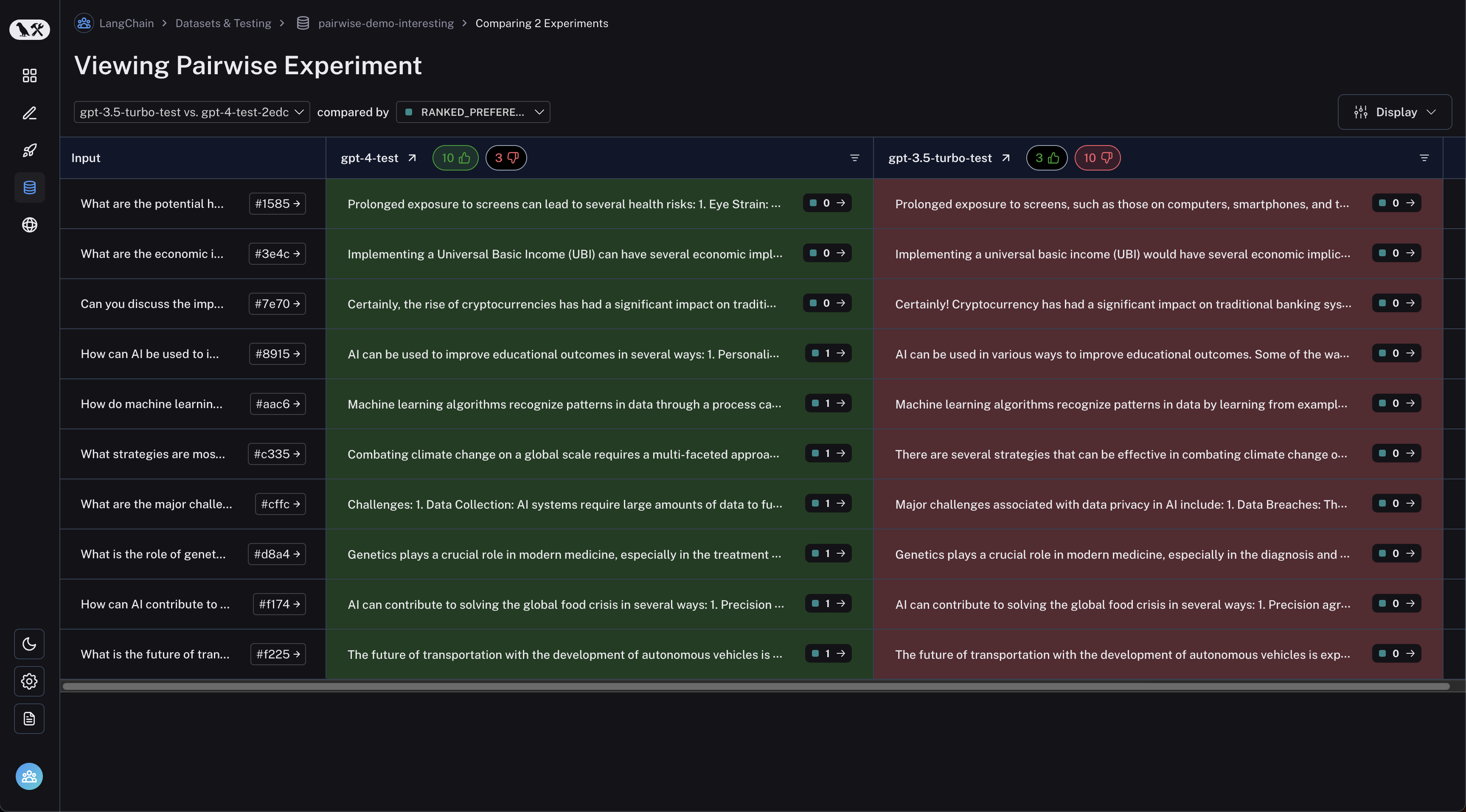
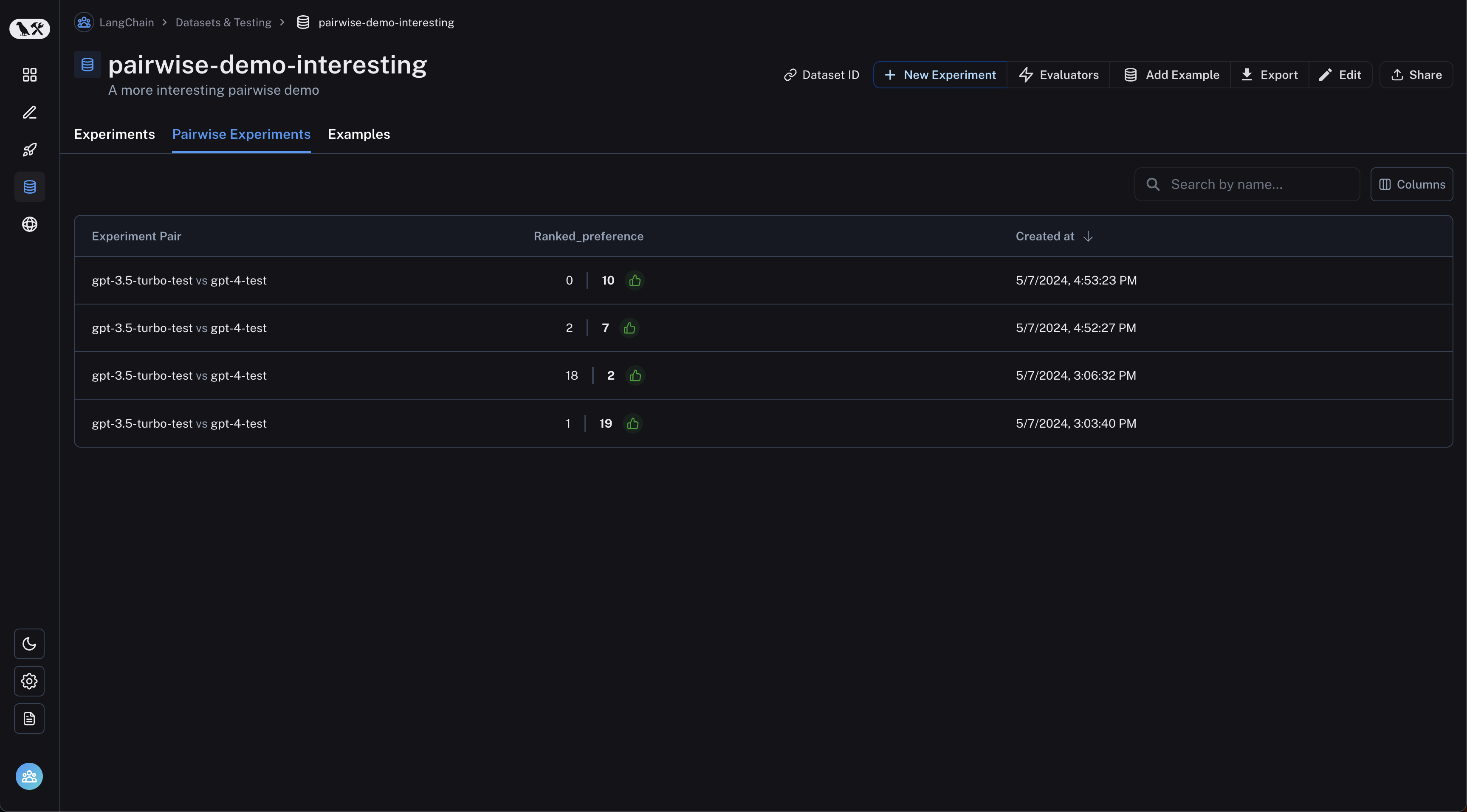
查看成对实验
从数据集页面导航到“成对实验”标签页:
点击您想要查看的成对实验,即可进入比较视图:
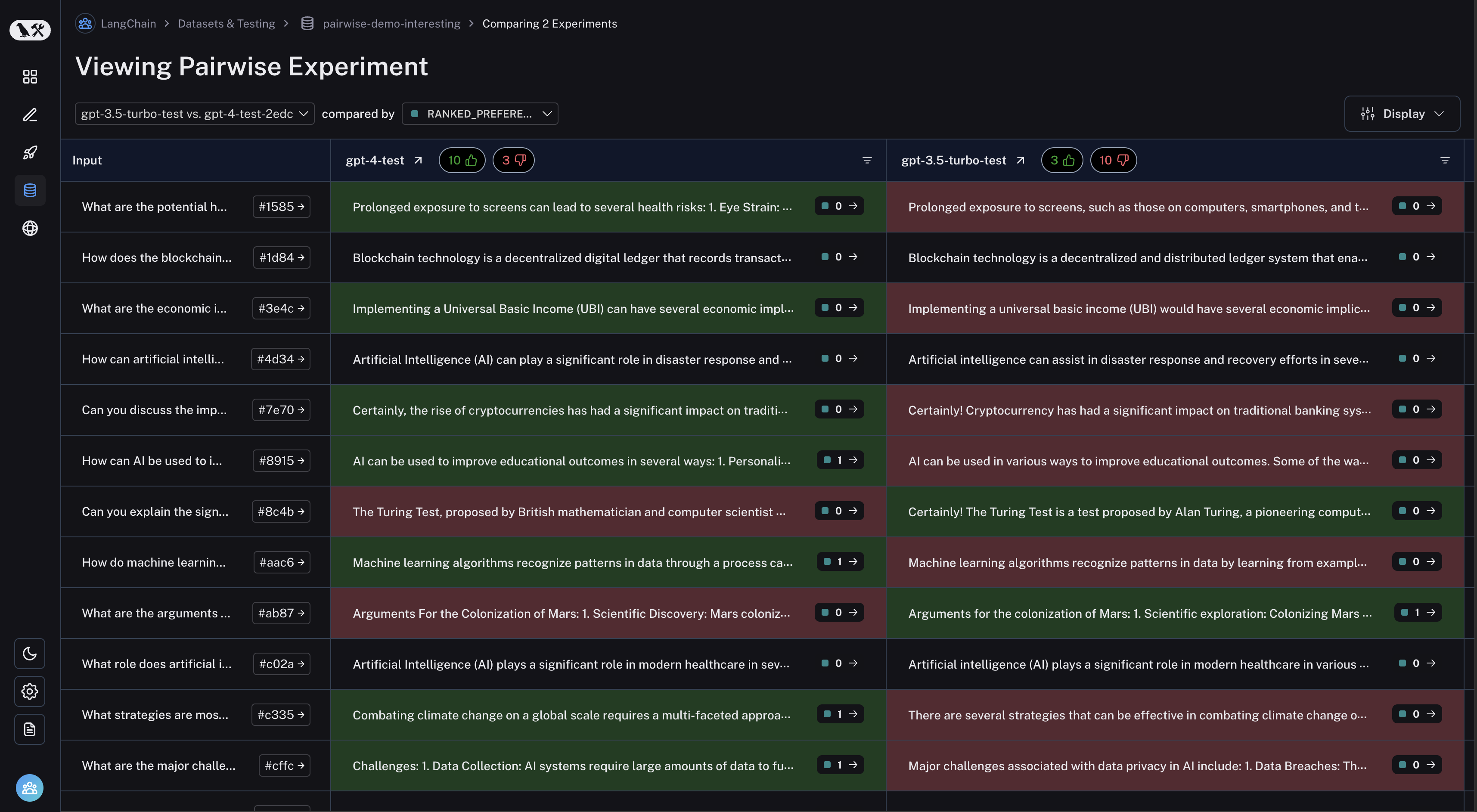
您可以通过点击表格标题中的“点赞”/“点踩”按钮,筛选出首次实验效果更好或更差的运行记录: