在代理的新版本上运行回测
部署你的应用只是持续改进过程的开始。 在生产环境中部署后,你需要通过优化提示词、语言模型、工具和架构来不断完善系统。 回溯测试(Backtesting)是指使用历史数据评估应用的新版本,并将新版本的输出结果与原始输出进行比较。 与使用预生产数据集进行的评估相比,回溯测试能更清晰地表明应用的新版本是否优于当前的部署版本。
以下是回测的基本步骤:
- 从您的生产追踪项目中选择示例运行进行测试。
- 将运行输入转换为数据集,并将运行输出记录为针对该数据集的初步实验。
- 在新数据集上运行你的新系统,并比较实验结果。
此过程将为您提供一组具有代表性的新输入数据集,您可以对其进行版本控制,并用于回测您的模型。
通常,你可能无法获得明确的“真实答案”。 在这种情况下,你可以手动标注输出结果,或使用不依赖参考数据的评估方法。 如果你的应用允许收集真实标签,例如通过让用户留下反馈,我们强烈建议这样做。
设置
配置环境
安装并设置环境变量。本指南需要 langsmith>=0.2.4。
为方便起见,本教程中我们将使用 LangChain 开源框架,但所展示的 LangSmith 功能与框架无关。
pip install -U langsmith langchain langchain-anthropic langchainhub emoji
import getpass
import os

# Set the project name to whichever project you'd like to be testing against
project_name = "Tweet Writing Task"
os.environ["LANGSMITH_PROJECT"] = project_name
os.environ["LANGSMITH_TRACING"] = "true"
if not os.environ.get("LANGSMITH_API_KEY"):
    os.environ["LANGSMITH_API_KEY"] = getpass.getpass("YOUR API KEY")

# Optional. You can swap OpenAI for any other tool-calling chat model.
os.environ["OPENAI_API_KEY"] = "YOUR OPENAI API KEY"
# Optional. You can swap Tavily for the free DuckDuckGo search tool if preferred.
# Get Tavily API key: https://tavily.com
os.environ["TAVILY_API_KEY"] = "YOUR TAVILY API KEY"
定义应用程序
在这个示例中,让我们创建一个简单的推文撰写应用程序,并为其提供一些互联网搜索工具:
from langchain.chat_models import init_chat_model
from langgraph.prebuilt import create_react_agent
from langchain_community.tools import DuckDuckGoSearchRun, TavilySearchResults
from langchain_core.rate_limiters import InMemoryRateLimiter

# We will use GPT-3.5 Turbo as the baseline and compare against GPT-4o
gpt_3_5_turbo = init_chat_model(
    "gpt-3.5-turbo",
    temperature=1,
    configurable_fields=("model", "model_provider"),
)

# The instrucitons are passed as a system message to the agent
instructions = """You are a tweet writing assistant. Given a topic, do some research and write a relevant and engaging tweet about it.
- Use at least 3 emojis in each tweet
- The tweet should be no longer than 280 characters
- Always use the search tool to gather recent information on the tweet topic
- Write the tweet only based on the search content. Do not rely on your internal knowledge
- When relevant, link to your sources
- Make your tweet as engaging as possible"""

# Define the tools our agent can use

# If you have a higher tiered Tavily API plan you can increase this
rate_limiter = InMemoryRateLimiter(requests_per_second=0.08)

# Use DuckDuckGo if you don't have a Tavily API key:
# tools = [DuckDuckGoSearchRun(rate_limiter=rate_limiter)]
tools = [TavilySearchResults(max_results=5, rate_limiter=rate_limiter)]

agent = create_react_agent(gpt_3_5_turbo, tools=tools, state_modifier=instructions)
模拟生产数据
现在让我们模拟一些生产数据:
fake_production_inputs = [
    "Alan turing's early childhood",
    "Economic impacts of the European Union",
    "Underrated philosophers",
    "History of the Roxie theater in San Francisco",
    "ELI5: gravitational waves",
    "The arguments for and against a parliamentary system",
    "Pivotal moments in music history",
    "Big ideas in programming languages",
    "Big questions in biology",
    "The relationship between math and reality",
    "What makes someone funny",
]

agent.batch(
    [{"messages": [{"role": "user", "content": content}]} for content in fake_production_inputs],
)
将生产跟踪转换为实验
第一步是根据生产中的输入生成数据集。 然后复制所有跟踪信息,作为基线实验。
选择要回测的运行
您可以使用 filter 参数中的 list_runs 来选择要进行回测的运行。
filter 参数使用 LangSmith trace 查询语法 来选择运行。
from datetime import datetime, timedelta, timezone
from uuid import uuid4
from langsmith import Client
from langsmith.beta import convert_runs_to_test

# Fetch the runs we want to convert to a dataset/experiment
client = Client()

# How we are sampling runs to include in our dataset
end_time = datetime.now(tz=timezone.utc)
start_time = end_time - timedelta(days=1)
run_filter = f'and(gt(start_time, "{start_time.isoformat()}"), lt(end_time, "{end_time.isoformat()}"))'
prod_runs = list(
    client.list_runs(
        project_name=project_name,
        execution_order=1,
        filter=run_filter,
    )
)
将运行转换为实验
convert_runs_to_test 是一个函数,它接收一些运行实例并执行以下操作:
- 输入以及可选的输出将作为示例保存到数据集。
- 输入和输出被存储为一个实验,就像你运行了
evaluate函数并收到了那些输出一样。
# Name of the dataset we want to create
dataset_name = f'{project_name}-backtesting {start_time.strftime("%Y-%m-%d")}-{end_time.strftime("%Y-%m-%d")}'
# Name of the experiment we want to create from the historical runs
baseline_experiment_name = f"prod-baseline-gpt-3.5-turbo-{str(uuid4())[:4]}"

# This converts the runs to a dataset + experiment
convert_runs_to_test(
    prod_runs,
    # Name of the resulting dataset
    dataset_name=dataset_name,
    # Whether to include the run outputs as reference/ground truth
    include_outputs=False,
    # Whether to include the full traces in the resulting experiment
    # (default is to just include the root run)
    load_child_runs=True,
    # Name of the experiment so we can apply evalautors to it after
    test_project_name=baseline_experiment_name
)
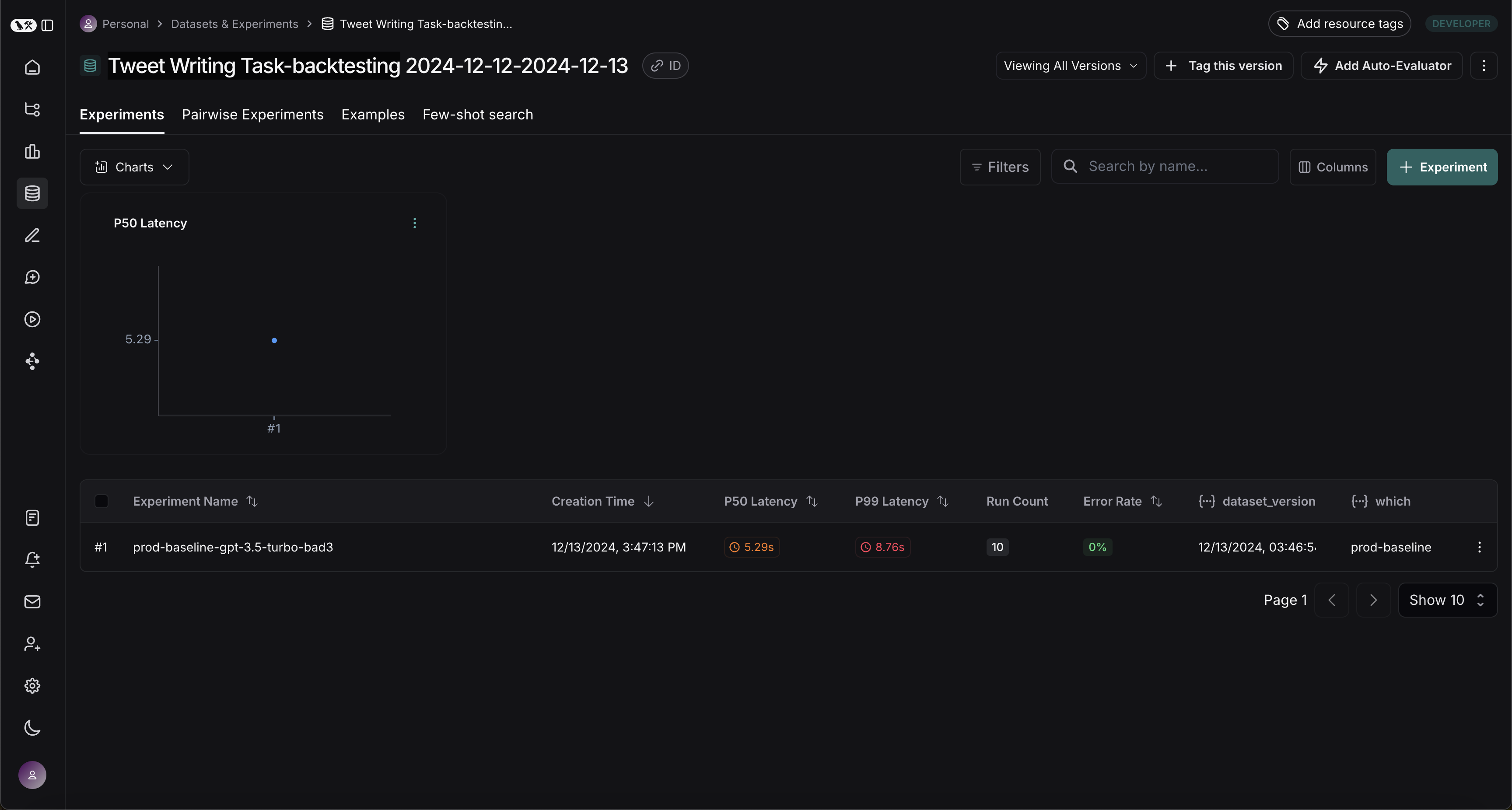
完成此步骤后,你应该会在你的 LangSmith 项目中看到一个名为 "Tweet Writing Task-backtesting TODAYS DATE" 的新数据集,其中包含一个实验,如下所示:
针对新系统的基准测试
现在我们可以开始将生产运行与新系统进行基准测试的流程。
定义评估器
首先,让我们定义将用于比较两个系统的评估器。 请注意,我们没有参考输出,因此需要制定仅依赖实际输出的评估指标。
import emoji
from pydantic import BaseModel, Field
from langchain_core.messages import convert_to_openai_messages

class Grade(BaseModel):
    """Grade whether a response is supported by some context."""
    grounded: bool = Field(..., description="Is the majority of the response supported by the retrieved context?")

grounded_instructions = f"""You have given somebody some contextual information and asked them to write a statement grounded in that context.

Grade whether their response is fully supported by the context you have provided. \
If any meaningful part of their statement is not backed up directly by the context you provided, then their response is not grounded. \
Otherwise it is grounded."""
grounded_model = init_chat_model(model="gpt-4o").with_structured_output(Grade)

def lt_280_chars(outputs: dict) -> bool:
    messages = convert_to_openai_messages(outputs["messages"])
    return len(messages[-1]['content']) <= 280

def gte_3_emojis(outputs: dict) -> bool:
    messages = convert_to_openai_messages(outputs["messages"])
    return len(emoji.emoji_list(messages[-1]['content'])) >= 3

async def is_grounded(outputs: dict) -> bool:
    context = ""
    messages = convert_to_openai_messages(outputs["messages"])
    for message in messages:
        if message["role"] == "tool":
            # Tool message outputs are the results returned from the Tavily/DuckDuckGo tool
            context += "\n\n" + message["content"]
    tweet = messages[-1]["content"]
    user = f"""CONTEXT PROVIDED:
    {context}

    RESPONSE GIVEN:
    {tweet}"""
    grade = await grounded_model.ainvoke([
        {"role": "system", "content": grounded_instructions},
        {"role": "user", "content": user}
    ])
    return grade.grounded
评估基线
现在,让我们针对基线实验运行我们的评估器。
baseline_results = await client.aevaluate(
    baseline_experiment_name,
    evaluators=[lt_280_chars, gte_3_emojis, is_grounded],
)
# If you have pandas installed can easily explore results as df:
# baseline_results.to_pandas()
定义和评估新系统
现在,让我们定义并评估我们的新系统。 在这个示例中,我们的新系统将与旧系统相同,但会使用 GPT-4o 而不是 GPT-3.5。 由于我们已经使模型可配置,因此只需更新传递给代理的默认配置即可:
candidate_results = await client.aevaluate(
    agent.with_config(model="gpt-4o"),
    data=dataset_name,
    evaluators=[lt_280_chars, gte_3_emojis, is_grounded],
    experiment_prefix="candidate-gpt-4o",
)
# If you have pandas installed can easily explore results as df:
# candidate_results.to_pandas()
比较结果
运行完两个实验后,你可以在数据集中查看它们:
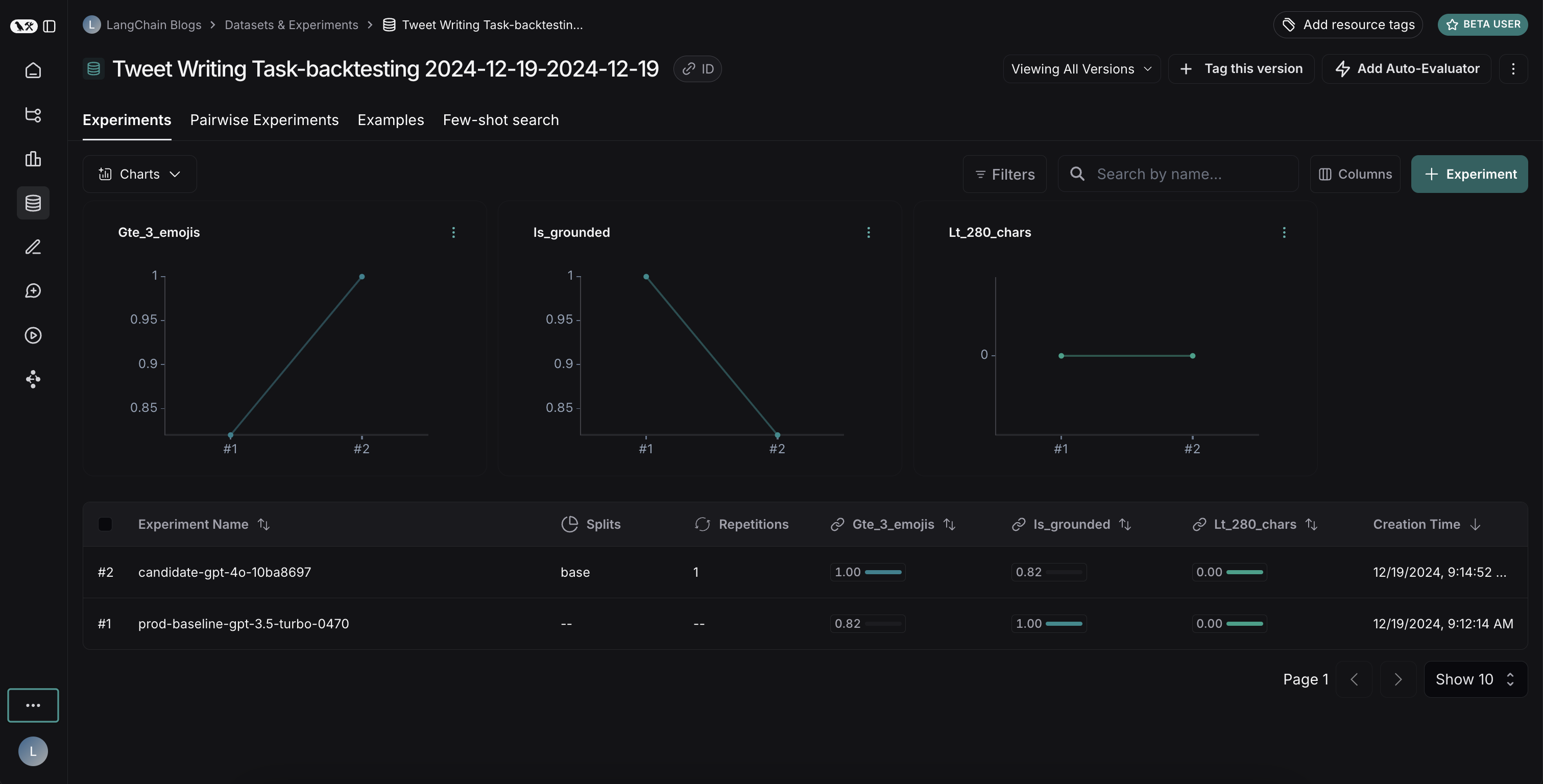
结果揭示了两种模型之间一个有趣的权衡:
- GPT-4o 在遵循格式规则方面表现出更优的性能,能够始终如一地包含所要求数量的表情符号
- 然而,GPT-4o 在坚持基于所提供的搜索结果方面可靠性较差
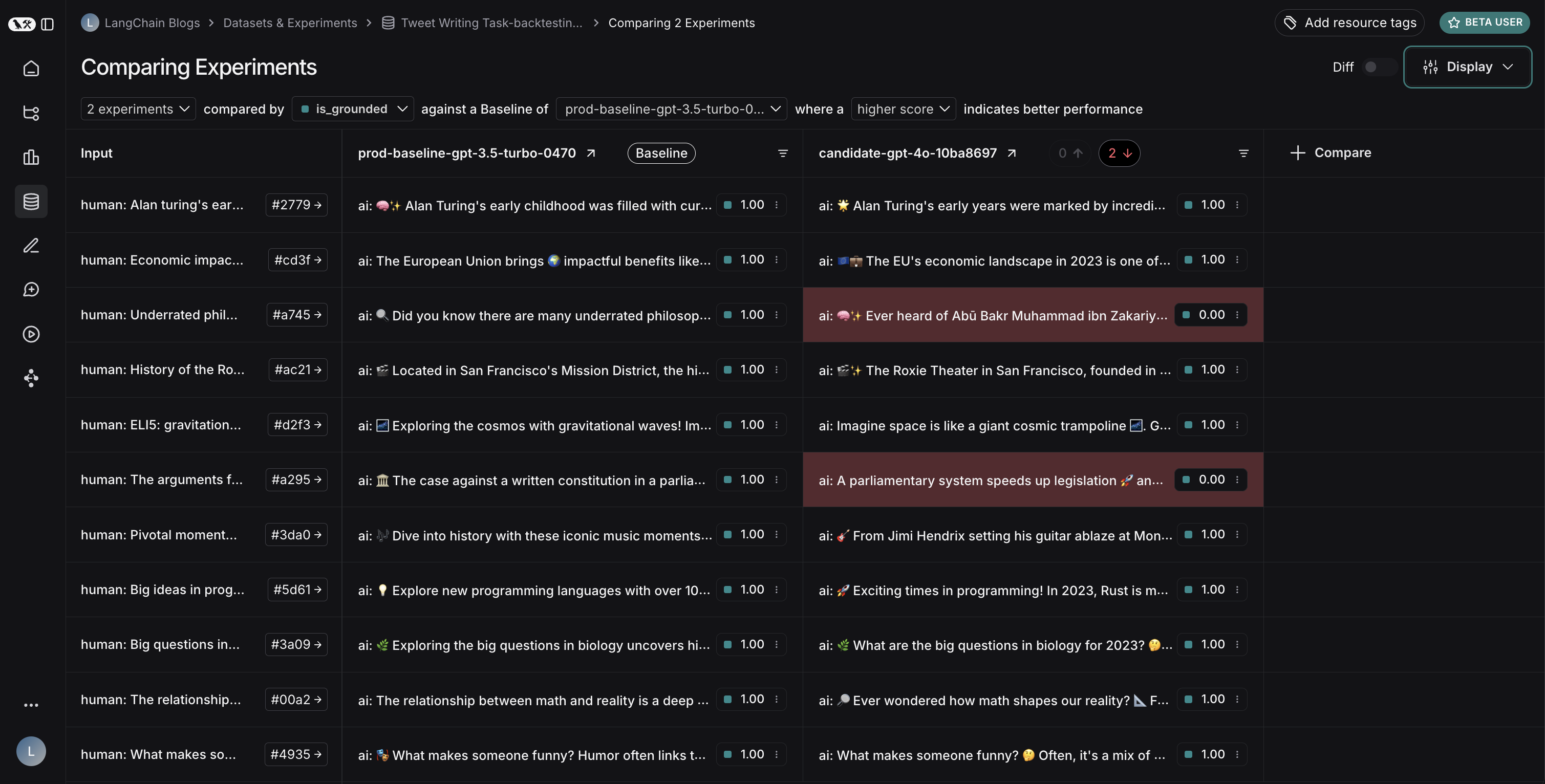
为了说明信息来源问题:在此示例运行中,GPT-4o包含了关于阿布·伯克尔·穆罕默德·伊本·扎卡里亚·拉齐医学贡献的事实,但这些事实并未出现在搜索结果中。这表明它是从其内部知识中提取信息,而非严格使用所提供的信息。
这次回测练习表明,尽管GPT-4o通常被认为是一个能力更强的模型,但仅仅升级到该模型并不能提升我们的推文生成器。为了有效使用GPT-4o,我们需要:
- 优化我们的提示,以更加强调仅使用所提供的信息
- 或者修改我们的系统架构,以更好地约束模型的输出
这一洞察展示了回测的价值——它帮助我们在部署前发现了潜在问题。