如何使用预构建的评估器
LangSmith 集成了开源的 openevals 包,提供了一套预构建的、即用型评估器,您可以立即将其作为评估工作的起点。
本指南将演示如何设置并运行一种评估器(即“大语言模型作为裁判”),但还有许多其他类型的评估器可供选择。 请参阅 openevals 和 agentevals 代码仓库,获取包含使用示例的完整列表。
设置
您需要安装 openevals 包,才能使用预构建的“大语言模型作为评判者”评估器。
- Python
- TypeScript
pip install -U openevals
yarn add openevals @langchain/core
你还需要将 OpenAI API 密钥设置为环境变量,不过你也可以选择其他提供商:
export OPENAI_API_KEY="your_openai_api_key"
我们还将使用 LangSmith 的 pytest 集成(适用于 Python)以及 Vitest/Jest(适用于 TypeScript)来运行评估。
openevals 同样也能与 evaluate 方法无缝集成。
请参阅 相应指南 获取安装说明。
运行评估器
通用流程非常简单:从 openevals 中导入评估器或工厂函数,然后在测试文件中使用输入、输出及参考输出运行该函数。LangSmith 将自动将评估器的结果作为反馈进行记录。
请注意,并非所有评估器都需要全部参数(例如,精确匹配评估器仅需输出结果和参考输出)。 此外,如果您的“大语言模型作为裁判”提示词需要额外变量,可将这些变量作为关键字参数(kwargs)传入,它们将被格式化并嵌入到提示词中。
像这样设置你的测试文件:
- Python
- TypeScript
import pytest

from langsmith import testing as t

from openevals.llm import create_llm_as_judge
from openevals.prompts import CORRECTNESS_PROMPT

correctness_evaluator = create_llm_as_judge(
prompt=CORRECTNESS_PROMPT,
feedback_key="correctness",
model="openai:o3-mini",
)

# Mock standin for your application
def my_llm_app(inputs: dict) -> str:
return "Doodads have increased in price by 10% in the past year."

@pytest.mark.langsmith
def test_correctness():
inputs = "How much has the price of doodads changed in the past year?"
reference_outputs = "The price of doodads has decreased by 50% in the past year."
outputs = my_llm_app(inputs)
t.log_inputs({"question": inputs})
t.log_outputs({"answer": outputs})
t.log_reference_outputs({"answer": reference_outputs})

correctness_evaluator(
    inputs=inputs,
    outputs=outputs,
    reference_outputs=reference_outputs
)
import * as ls from "langsmith/vitest";
// import * as ls from "langsmith/jest";

import { createLLMAsJudge, CORRECTNESS_PROMPT } from "openevals";

const correctnessEvaluator = createLLMAsJudge({
prompt: CORRECTNESS_PROMPT,
feedbackKey: "correctness",
model: "openai:o3-mini",
});

// Mock standin for your application
const myLLMApp = async (_inputs: Record<string, unknown>) => {
return "Doodads have increased in price by 10% in the past year.";
}

ls.describe("Correctness", () => {
ls.test("incorrect answer", {
inputs: {
  question: "How much has the price of doodads changed in the past year?"
},
referenceOutputs: {
  answer: "The price of doodads has decreased by 50% in the past year."
}
}, async ({ inputs, referenceOutputs }) => {
const outputs = await myLLMApp(inputs);
ls.logOutputs({ answer: outputs });

await correctnessEvaluator({
  inputs,
  outputs,
  referenceOutputs,
});
});
});
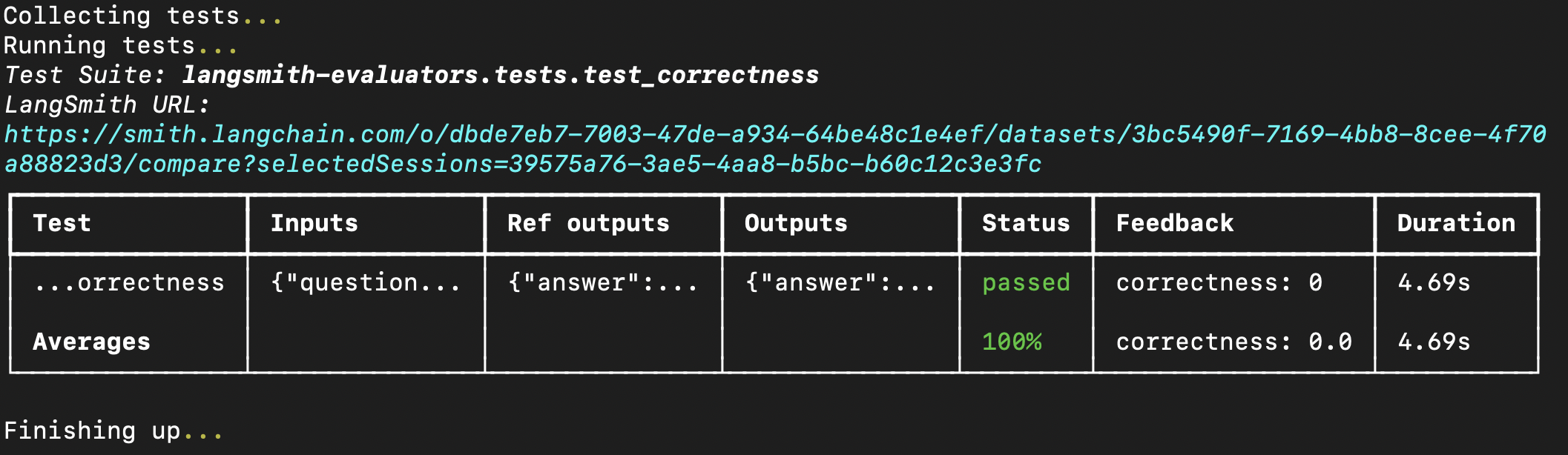
feedback_key/feedbackKey 参数将用作您实验中反馈的名称。
在终端中运行评估将得到类似以下的结果:
您也可以将预构建的评估器直接传入 evaluate 方法中,前提是您已在 LangSmith 中创建了数据集。
如果使用 Python,则需要 langsmith>=0.3.11:
- Python
- TypeScript
from langsmith import Client
from openevals.llm import create_llm_as_judge
from openevals.prompts import CONCISENESS_PROMPT

client = Client()

conciseness_evaluator = create_llm_as_judge(
prompt=CONCISENESS_PROMPT,
feedback_key="conciseness",
model="openai:o3-mini",
)

experiment_results = client.evaluate(
# This is a dummy target function, replace with your actual LLM-based system
lambda inputs: "What color is the sky?",
data="Sample dataset",
evaluators=[
    conciseness_evaluator
]
)
import { evaluate } from "langsmith/evaluation";
import { createLLMAsJudge, CONCISENESS_PROMPT } from "openevals";

const concisenessEvaluator = createLLMAsJudge({
prompt: CONCISENESS_PROMPT,
feedbackKey: "conciseness",
model: "openai:o3-mini",
});

await evaluate(
(inputs) => "What color is the sky?",
{
data: datasetName,
evaluators: [concisenessEvaluator],
}
);
有关可用评估器的完整列表,请参阅 openevals 和 agentevals 代码仓库。