如何使用 pytest 运行评估(beta)
LangSmith pytest 插件允许 Python 开发人员将数据集和评估定义为 pytest 测试用例。
与 evaluate() 评估流程相比,此方法在以下情况下非常有用:
- 每个示例都需要不同的评估逻辑
- 您希望断言二元期望值,同时在 LangSmith 中跟踪这些断言,并在本地(例如在 CI 流水线中)抛出断言错误。
- 你希望获得类似 pytest 的终端输出
- 你已经在使用 pytest 测试你的应用,并希望添加 LangSmith 跟踪功能
pytest 集成目前处于测试阶段,后续版本中可能会发生变化。
JS/TS SDK 具有类似的 Vitest/Jest 集成。
安装
此功能需要 Python SDK 版本 langsmith>=0.3.4。
pip install -U "langsmith[pytest]"
定义并运行测试
pytest 集成允许您将数据集和评估器定义为测试用例。
要在 LangSmith 中跟踪测试,请添加 @pytest.mark.langsmith 装饰器。
每个被装饰的测试用例都将同步到数据集示例中。
运行测试套件时,数据集将被更新,并会创建一个新实验,其中为每个测试用例生成一个结果。
###################### my_app/main.py ######################
import openai
from langsmith import traceable, wrappers

oai_client = wrappers.wrap_openai(openai.OpenAI())

@traceable
def generate_sql(user_query: str) -> str:
    result = oai_client.chat.completions.create(
        model="gpt-4o-mini",
        messages=[
            {"role": "system", "content": "Convert the user query to a SQL query."},
            {"role": "user", "content": user_query},
        ],
    )
    return result.choices[0].message.content

###################### tests/test_my_app.py ######################
import pytest
from langsmith import testing as t

def is_valid_sql(query: str) -> bool:
    """Return True if the query is valid SQL."""
    return True  # Dummy implementation

@pytest.mark.langsmith  # <-- Mark as a LangSmith test case
def test_sql_generation_select_all() -> None:
    user_query = "Get all users from the customers table"
    t.log_inputs({"user_query": user_query})  # <-- Log example inputs, optional

    expected = "SELECT * FROM customers;"
    t.log_reference_outputs({"sql": expected})  # <-- Log example reference outputs, optional

    sql = generate_sql(user_query)
    t.log_outputs({"sql": sql})  # <-- Log run outputs, optional

    t.log_feedback(key="valid_sql", score=is_valid_sql(sql))  # <-- Log feedback, optional

    assert sql == expected  # <-- Test pass/fail status automatically logged to LangSmith under 'pass' feedback key
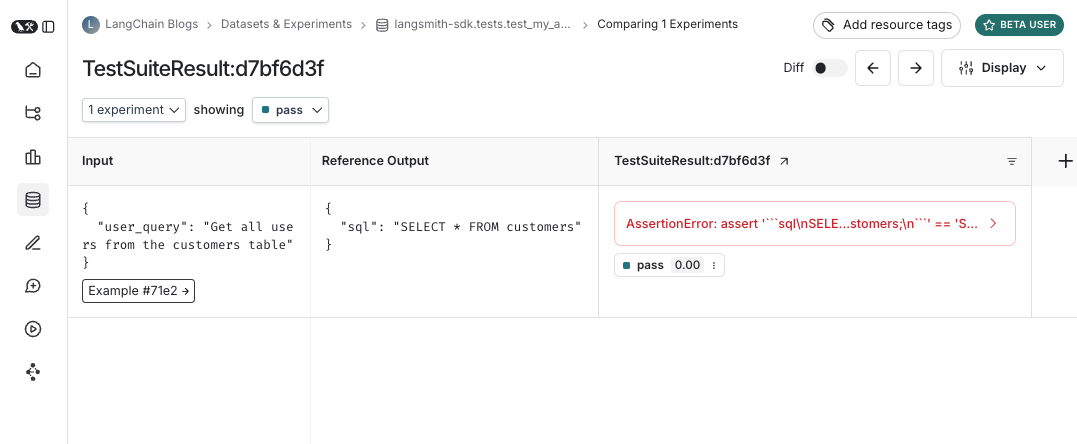
运行此测试时,将根据测试用例是否通过/失败,自动生成一个默认的布尔型反馈键 pass。
同时,系统还会记录您所提交的所有输入、输出以及参考(即预期)输出。
使用 pytest 即可像平常一样运行测试:
pytest tests/
在大多数情况下,我们建议设置测试套件名称:
LANGSMITH_TEST_SUITE='SQL app tests' pytest tests/
每次运行此测试套件时,LangSmith:
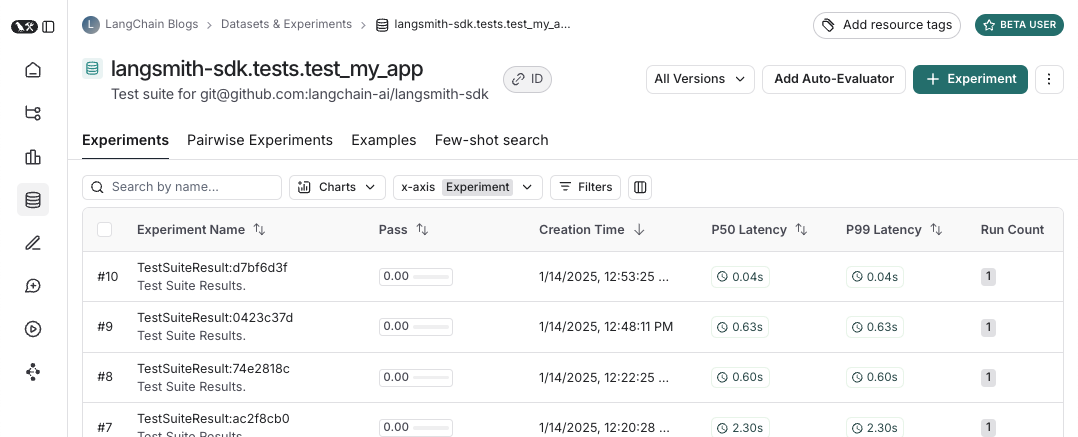
- 为每个测试文件创建一个数据集。如果该测试文件对应的数据集已存在,则会对其进行更新。
- 在每个已创建或已更新的数据集内创建一个实验
- 为每个测试用例创建一个实验行,其中包含您已记录的输入、输出、参考输出和反馈
- 收集每个测试用例在
pass反馈键下的通过/失败率
以下是测试套件数据集的示例:
以及针对该测试套件的实验看起来是什么样子:
记录输入、输出和参考输出
每次运行测试时,我们都会将其同步到数据集示例中,并将该次执行记录为一次运行。
我们有多种方式可以追踪示例输入、参考输出以及运行输出。
最简单的方法是使用 log_inputs、log_outputs 和 log_reference_outputs 方法。
您可以在测试中的任意时刻调用这些方法,以更新该测试对应的示例和运行记录:
import pytest
from langsmith import testing as t

@pytest.mark.langsmith
def test_foo() -> None:
    t.log_inputs({"a": 1, "b": 2})
    t.log_reference_outputs({"foo": "bar"})
    t.log_outputs({"foo": "baz"})
    assert True
运行此测试将创建或更新一个名为“test_foo”的示例,其输入为 {"a": 1, "b": 2},参考输出为 {"foo": "bar"},并追踪一次运行,其输出为 {"foo": "baz"}。
注意:如果两次运行 log_inputs、log_outputs 或 log_reference_outputs,先前的值将被覆盖。
另一种定义示例输入和参考输出的方法是通过 pytest 的 fixture(测试夹具)或参数化功能。
默认情况下,测试函数的所有参数都会被记录为对应示例的输入。
如果某些参数旨在表示参考输出,则可通过 @pytest.mark.langsmith(output_keys=["name_of_ref_output_arg"]) 指定将其记录为参考输出:
import pytest

@pytest.fixture
def c() -> int:
    return 5

@pytest.fixture
def d() -> int:
    return 6

@pytest.mark.langsmith(output_keys=["d"])
def test_cd(c: int, d: int) -> None:
    result = 2 * c
    t.log_outputs({"d": result})  # Log run outputs
    assert result == d
这将创建/同步一个名为“test_cd”的示例,其输入为 {"c": 5},参考输出为 {"d": 6},运行输出为 {"d": 10}。
记录反馈
默认情况下,LangSmith 会针对每个测试用例,在 pass 反馈键下收集通过/失败率。
您可以通过 log_feedback 添加额外的反馈。
import openai
import pytest
from langsmith import wrappers
from langsmith import testing as t

oai_client = wrappers.wrap_openai(openai.OpenAI())

@pytest.mark.langsmith
def test_offtopic_input() -> None:
    user_query = "whats up"
    t.log_inputs({"user_query": user_query})

    sql = generate_sql(user_query)
    t.log_outputs({"sql": sql})

    expected = "Sorry that is not a valid query."
    t.log_reference_outputs({"sql": expected})

    # Use this context manager to trace any steps used for generating evaluation
    # feedback separately from the main application logic
    with t.trace_feedback():
        instructions = (
            "Return 1 if the ACTUAL and EXPECTED answers are semantically equivalent, "
            "otherwise return 0. Return only 0 or 1 and nothing else."
        )
        grade = oai_client.chat.completions.create(
            model="gpt-4o-mini",
            messages=[
                {"role": "system", "content": instructions},
                {"role": "user", "content": f"ACTUAL: {sql}\nEXPECTED: {expected}"},
            ],
        )
        score = float(grade.choices[0].message.content)
        t.log_feedback(key="correct", score=score)

    assert score
请注意使用 trace_feedback() 上下文管理器。这使得作为评判器的大语言模型(LLM)调用被单独追踪,与测试用例的其余部分相分离。
该调用不会显示在主测试用例的执行过程中,而是会显示在 correct 反馈键的追踪信息中。
注意:请确保与反馈追踪相关的 log_feedback 调用位于 trace_feedback 上下文内部。
这样我们才能将反馈与追踪关联起来;当您在用户界面中查看反馈时,即可点击该反馈以查看生成它的追踪记录。
追踪中间调用
LangSmith 将自动追踪测试用例执行过程中发生的任何可追踪的中间调用。
将测试归类到测试套件中
默认情况下,给定文件中的所有测试将被归为一个单独的“测试套件”,并对应一个数据集。
您可以通过向 @pytest.mark.langsmith 传入 test_suite_name 参数,按用例分别指定测试所属的测试套件;或者设置 LANGSMITH_TEST_SUITE 环境变量,将一次执行中的所有测试归入同一个测试套件:
LANGSMITH_TEST_SUITE="SQL app tests" pytest tests/
我们通常建议将该值设为 LANGSMITH_TEST_SUITE,以便获得所有结果的汇总视图。
命名实验
您可以使用 LANGSMITH_EXPERIMENT 环境变量为实验命名:
LANGSMITH_TEST_SUITE="SQL app tests" LANGSMITH_EXPERIMENT="baseline" pytest tests/
缓存
在 CI 中每次提交都运行大语言模型(LLM)可能成本高昂。
为节省时间和资源,LangSmith 允许您将 HTTP 请求缓存到磁盘。
要启用缓存,请使用 langsmith[pytest] 安装,并设置环境变量 LANGSMITH_TEST_CACHE=/my/cache/path:
pip install -U "langsmith[pytest]"
LANGSMITH_TEST_CACHE=tests/cassettes pytest tests/my_llm_tests
所有请求都将被缓存到 tests/cassettes,并在后续运行中从此处加载。如果您将此文件提交到代码仓库,持续集成(CI)系统也能使用该缓存。
pytest 功能
@pytest.mark.langsmith 旨在不干扰您的开发流程,并能与您熟悉的 pytest 功能良好协作。
使用 pytest.mark.parametrize 进行参数化
您可以像之前一样使用 parametrize 装饰器。
这将为测试的每个参数化实例创建一个新的测试用例。
@pytest.mark.langsmith(output_keys=["expected_sql"])
@pytest.mark.parametrize(
    "user_query, expected_sql",
    [
        ("Get all users from the customers table", "SELECT * FROM customers"),
        ("Get all users from the orders table", "SELECT * FROM orders"),
    ],
)
def test_sql_generation_parametrized(user_query, expected_sql):
    sql = generate_sql(user_query)
    assert sql == expected_sql
注意:随着参数化列表的增大,您可考虑改用 evaluate()。这将并行执行评估,从而更便于分别控制各个实验及其对应的数据集。
使用 pytest-xdist 进行并行化
您可以像平常一样使用 pytest-xdist 来并行执行测试:
pip install -U pytest-xdist
pytest -n auto tests
使用 pytest-asyncio 进行异步测试
@pytest.mark.langsmith 支持同步和异步测试,因此您可以完全按照之前的方式运行异步测试。
启用监视模式,参数为 pytest-watch
使用监听模式(watch mode)快速迭代测试。我们强烈建议仅在启用测试缓存(见下文)的情况下使用此模式,以避免不必要的大型语言模型(LLM)调用:
pip install pytest-watch
LANGSMITH_TEST_CACHE=tests/cassettes ptw tests/my_llm_tests
丰富的输出
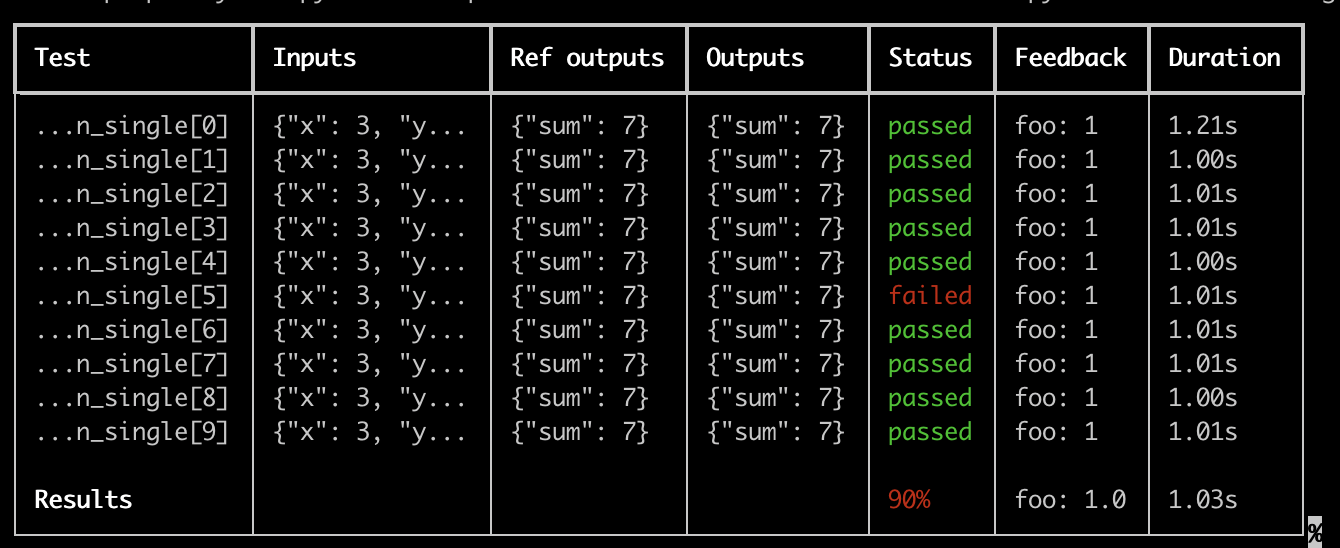
如果您希望以丰富的格式查看测试运行的 LangSmith 结果,可以指定 --langsmith-output:
pytest --langsmith-output tests
注意: 此标志在 langsmith<=0.3.3 版本中曾为 --output=langsmith,现已更新以避免与其他 pytest 插件发生冲突。
每个测试套件都会生成一个美观的表格,随着结果上传至 LangSmith,该表格将实时更新:
使用此功能的一些重要注意事项:
- 请确保已安装
pip install -U "langsmith[pytest]" - 富文本输出当前不支持
pytest-xdist
注意:自定义输出会移除所有标准的 pytest 输出。 如果您正尝试调试某些意外行为,通常显示常规的 pytest 输出会更有利于获取完整的错误追踪信息。
试运行模式
如果您希望在不将测试结果同步到 LangSmith 的情况下运行测试,可以在环境中设置为 LANGSMITH_TEST_TRACKING=false。
LANGSMITH_TEST_TRACKING=false pytest tests/
测试将正常运行,但实验日志不会发送到 LangSmith。
期望
LangSmith 提供了一个 expect 工具,用于帮助定义您对大语言模型(LLM)输出的预期。例如:
from langsmith import expect

@pytest.mark.langsmith
def test_sql_generation_select_all():
    user_query = "Get all users from the customers table"
    sql = generate_sql(user_query)
    expect(sql).to_contain("customers")
此操作会将二进制“期望值”分数记录到实验结果中,同时将该期望值设为 assert,这可能导致测试失败。
expect 还提供了“模糊匹配”方法。例如:
@pytest.mark.langsmith(output_keys=["expectation"])
@pytest.mark.parametrize(
    "query, expectation",
    [
       ("what's the capital of France?", "Paris"),
    ],
)
def test_embedding_similarity(query, expectation):
    prediction = my_chatbot(query)
    expect.embedding_distance(
        # This step logs the distance as feedback for this run
        prediction=prediction, expectation=expectation
    # Adding a matcher (in this case, 'to_be_*"), logs 'expectation' feedback
    ).to_be_less_than(0.5) # Optional predicate to assert against
    expect.edit_distance(
        # This computes the normalized Damerau-Levenshtein distance between the two strings
        prediction=prediction, expectation=expectation
    # If no predicate is provided below, 'assert' isn't called, but the score is still logged
    )
本测试用例将获得4个评分:
- 预测值与期望值之间的
embedding_distance - 二进制
expectation分数(若余弦距离小于 0.5,则为 1;否则为 0) - 预测值与期望值之间的
edit_distance - 整体测试通过/失败得分(二进制)
expect 工具借鉴了 Jest 的 expect API,并内置了一些开箱即用的功能,以便更轻松地评估您的大语言模型(LLM)。
旧版
@test / @unit 装饰器
标记测试用例的传统方法是使用 @test 或 @unit 装饰器:
from langsmith import test

@test
def test_foo() -> None:
    pass