如何使用 REST API 上传在 LangSmith 外部运行的实验
一些用户倾向于在 LangSmith 外部管理其数据集并运行实验,但仍希望使用 LangSmith 的用户界面来查看结果。我们通过 /datasets/upload-experiment 接口支持此功能。
本指南将向您展示如何使用 REST API 上传评估数据,并以 Python 中的 requests 库为例进行说明。不过,相同的原理适用于任何编程语言。
请求正文架构
上传实验需要指定实验及数据集相关的高层信息,以及实验中各个示例和运行的详细数据。`0` 中的每个对象代表实验中的一个“行”——即单个数据集示例及其关联的一次运行。请注意,`1` 和 `2` 指向您外部系统中的数据集标识符,LangSmith 将利用它们将外部实验归并到同一数据集中。它们不应指向 LangSmith 中已存在的数据集(除非该数据集是通过此接口创建的)。
您可以使用以下模式将实验上传至 /datasets/upload-experiment 端点:
{
  "experiment_name": "string (required)",
  "experiment_description": "string (optional)",
  "experiment_start_time": "datetime (required)",
  "experiment_end_time": "datetime (required)",
  "dataset_id": "uuid (optional - an external dataset id, used to group experiments together)",
  "dataset_name": "string (optional - must provide either dataset_id or dataset_name)",
  "dataset_description": "string (optional)",
  "experiment_metadata": { // Object (any shape - optional)
    "key": "value"
  },
  "summary_experiment_scores": [ // List of summary feedback objects (optional)
    {
      "key": "string (required)",
      "score": "number (optional)",
      "value": "string (optional)",
      "comment": "string (optional)",
      "feedback_source": { // Object (optional)
        "type": "string (required)"
      },
      "feedback_config": { // Object (optional)
        "type": "string enum: continuous, categorical, or freeform",
        "min": "number (optional)",
        "max": "number (optional)",
        "categories": [ // List of feedback category objects (optional)
            "value": "number (required)",
            "label": "string (optional)"
        ]
      },
      "created_at": "datetime (optional - defaults to now)",
      "modified_at": "datetime (optional - defaults to now)",
      "correction": "Object or string (optional)"
    }
  ],
  "results": [ // List of experiment row objects (required)
    {
      "row_id": "uuid (required)",
      "inputs": {     // Object (required - any shape). This will
        "key": "val"  // be the input to both the run and the dataset example.
      },
      "expected_outputs": { // Object (optional - any shape).
        "key": "val"        // These will be the outputs of the dataset examples.
      },
      "actual_outputs": { // Object (optional - any shape).
        "key": "val       // These will be the outputs of the runs.
      },
      "evaluation_scores": [ // List of feedback objects for the run (optional)
        {
            "key": "string (required)",
            "score": "number (optional)",
            "value": "string (optional)",
            "comment": "string (optional)",
            "feedback_source": { // Object (optional)
                "type": "string (required)"
            },
            "feedback_config": { // Object (optional)
                "type": "string enum: continuous, categorical, or freeform",
                "min": "number (optional)",
                "max": "number (optional)",
                "categories": [ // List of feedback category objects (optional)
                    "value": "number (required)",
                    "label": "string (optional)"
                ]
            },
            "created_at": "datetime (optional - defaults to now)",
            "modified_at": "datetime (optional - defaults to now)",
            "correction": "Object or string (optional)"
        }
      ],
      "start_time": "datetime (required)", // The start/end times for the runs will be used to
      "end_time": "datetime (required)",   // calculate latency. They must all fall between the
      "run_name": "string (optional)",     // start and end times for the experiment.
      "error": "string (optional)",
      "run_metadata": { // Object (any shape - optional)
        "key": "value"
      }
    }
  ]
}
响应的 JSON 将是一个字典,其键为 experiment 和 dataset,每个键对应的值均为一个对象,其中包含所创建实验和数据集的相关信息。
注意事项
您可通过在多次调用中提供相同的 dataset_id 或 dataset_name,将多个实验上传至同一数据集。您的实验将被归入同一个数据集下,您将能够使用对比视图来比较各实验的结果。
确保您各行的起始时间和结束时间均在实验的起始时间和结束时间范围内。
您必须提供 dataset_id 或 dataset_name 中的至少一个。如果您仅提供 ID,而该数据集尚不存在,我们将为您生成一个名称;反之,如果您仅提供名称,我们也将为您生成一个 ID。
您不能将实验上传至非通过此端点创建的数据集。仅支持将实验上传至外部管理的数据集。
示例请求
以下是调用 /datasets/upload-experiment 的简单示例。这是一个基础示例,仅使用了最重要的字段以作说明。
import os
import requests

body = {
  "experiment_name": "My external experiment",
  "experiment_description": "An experiment uploaded to LangSmith",
  "dataset_name": "my-external-dataset",
  "summary_experiment_scores": [
    {
      "key": "summary_accuracy",
      "score": 0.9,
      "comment": "Great job!"
    }
  ],
  "results": [
    {
      "row_id": "<<uuid>>",
      "inputs": {
        "input": "Hello, what is the weather in San Francisco today?"
      },
      "expected_outputs": {
        "output": "Sorry, I am unable to provide information about the current weather."
      },
      "actual_outputs": {
        "output": "The weather is partly cloudy with a high of 65."
      },
      "evaluation_scores": [
        {
          "key": "hallucination",
          "score": 1,
          "comment": "The chatbot made up the weather instead of identifying that "
                     "they don't have enough info to answer the question. This is "
                     "a hallucination."
        }
      ],
      "start_time": "2024-08-03T00:12:39",
      "end_time": "2024-08-03T00:12:41",
      "run_name": "Chatbot"
    },
    {
      "row_id": "<<uuid>>",
      "inputs": {
        "input": "Hello, what is the square root of 49?"
      },
      "expected_outputs": {
        "output": "The square root of 49 is 7."
      },
      "actual_outputs": {
        "output": "7."
      },
      "evaluation_scores": [
       {
          "key": "hallucination",
          "score": 0,
          "comment": "The chatbot correctly identified the answer. This is not a "
                     "hallucination."
        }
      ],
      "start_time": "2024-08-03T00:12:40",
      "end_time": "2024-08-03T00:12:42",
      "run_name": "Chatbot"
    }
  ],
  "experiment_start_time": "2024-08-03T00:12:38",
  "experiment_end_time": "2024-08-03T00:12:43"
}

resp = requests.post(
    "https://api.smith.langchain.com/api/v1/datasets/upload-experiment", # Update appropriately for self-hosted installations or the EU region
    json=body,
    headers={"x-api-key": os.environ["LANGSMITH_API_KEY"]}
)
print(resp.json())
以下是收到的响应:
{
  "dataset": {
    "name": "my-external-dataset",
    "description": null,
    "created_at": "2024-08-03T00:36:23.289730+00:00",
    "data_type": "kv",
    "inputs_schema_definition": null,
    "outputs_schema_definition": null,
    "externally_managed": true,
    "id": "<<uuid>>",
    "tenant_id": "<<uuid>>",
    "example_count": 0,
    "session_count": 0,
    "modified_at": "2024-08-03T00:36:23.289730+00:00",
    "last_session_start_time": null
  },
  "experiment": {
    "start_time": "2024-08-03T00:12:38",
    "end_time": "2024-08-03T00:12:43+00:00",
    "extra": null,
    "name": "My external experiment",
    "description": "An experiment uploaded to LangSmith",
    "default_dataset_id": null,
    "reference_dataset_id": "<<uuid>>",
    "trace_tier": "longlived",
    "id": "<<uuid>>",
    "run_count": null,
    "latency_p50": null,
    "latency_p99": null,
    "first_token_p50": null,
    "first_token_p99": null,
    "total_tokens": null,
    "prompt_tokens": null,
    "completion_tokens": null,
    "total_cost": null,
    "prompt_cost": null,
    "completion_cost": null,
    "tenant_id": "<<uuid>>",
    "last_run_start_time": null,
    "last_run_start_time_live": null,
    "feedback_stats": null,
    "session_feedback_stats": null,
    "run_facets": null,
    "error_rate": null,
    "streaming_rate": null,
    "test_run_number": 1
  }
}
请注意,实验结果中的延迟和反馈统计信息为空,因为这些运行记录尚未完成持久化,该过程可能需要几秒钟时间。 如果您保存实验 ID,并在几秒钟后再次查询,您将看到所有统计信息(不过 token 数量/费用仍为空,因为我们未在请求体中要求提供此信息)。
在用户界面中查看实验
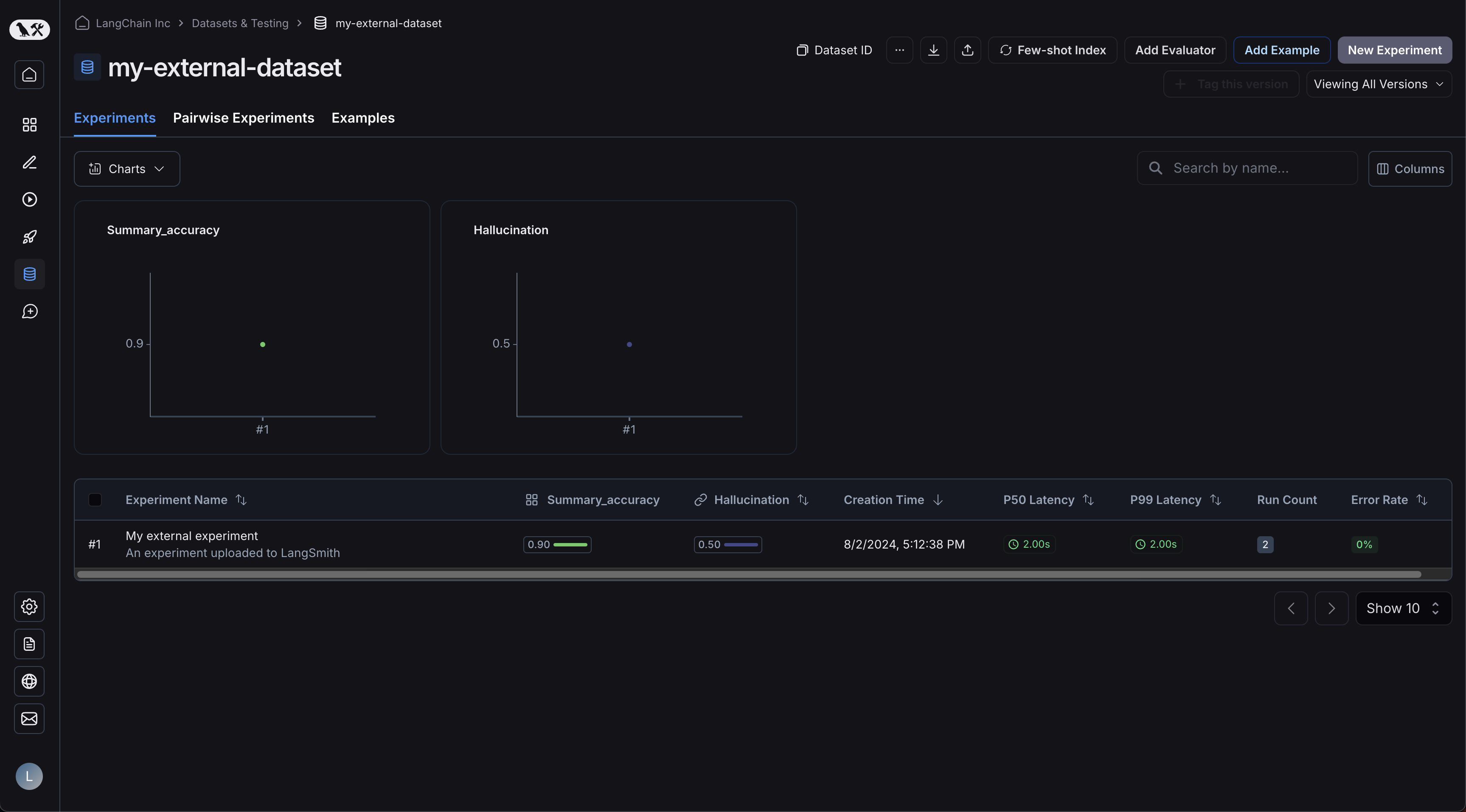
现在,请登录用户界面并点击您新创建的数据集!您将看到一个单独的实验:
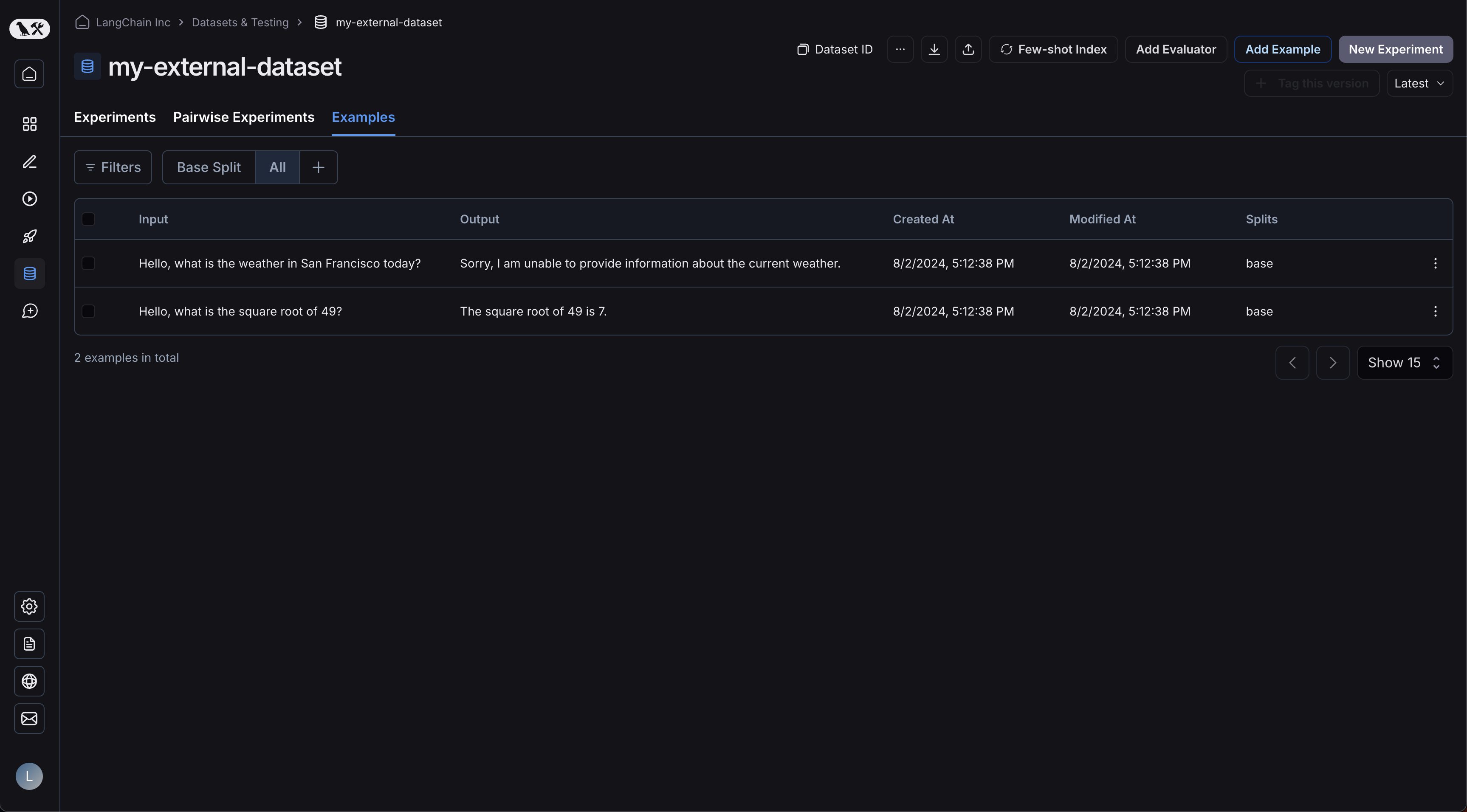
您的示例已上传:
点击您的实验将带您进入对比视图:
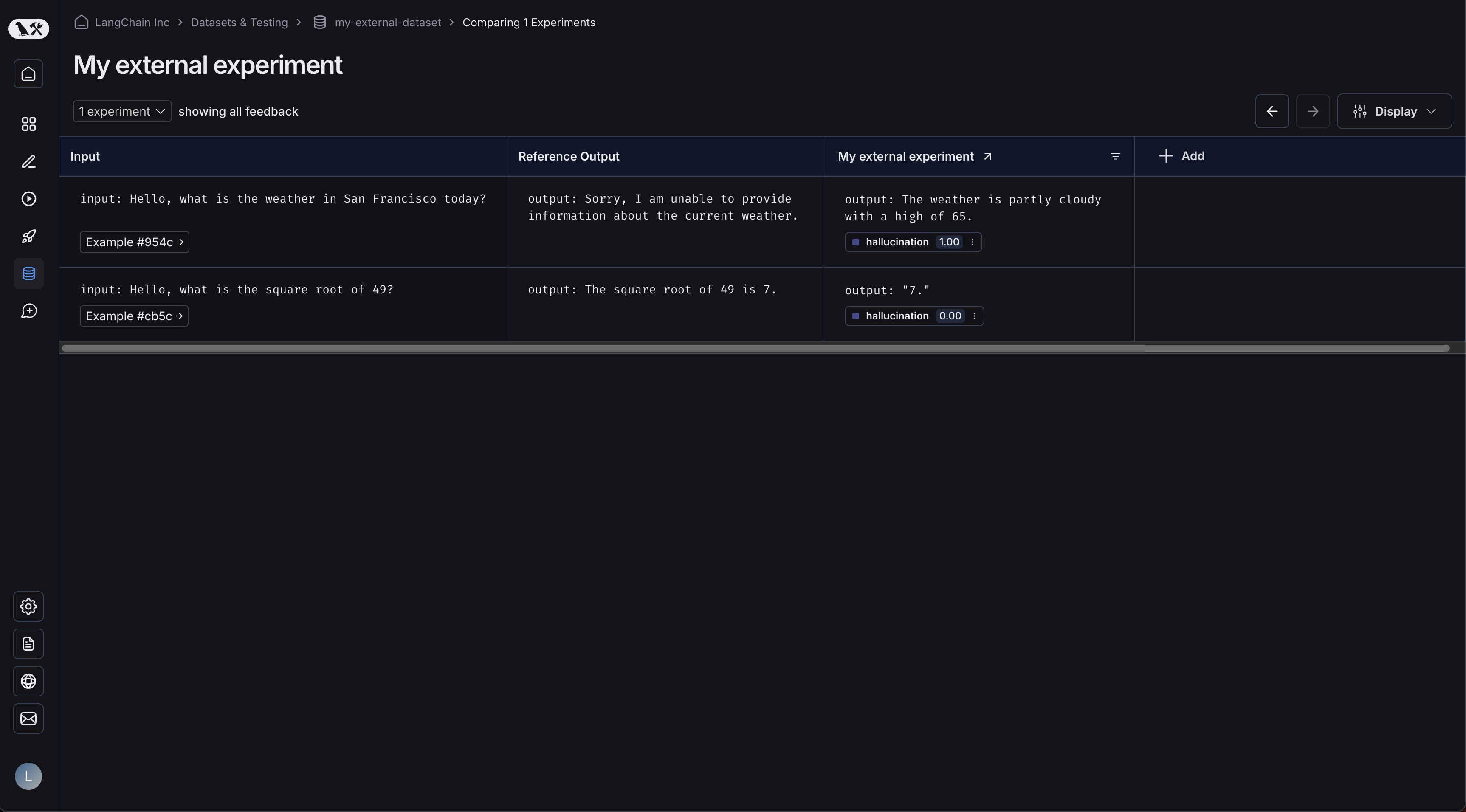
随着您向数据集上传更多实验,您将能够在对比视图中比较结果,并轻松识别出性能退化问题。